
Not for sale yet

FeaturesEverything Aivion does, in view

Just watch along.

Everything Aivion does, with the app itself in view. Jump to a part, or scroll through at your own pace.

One agent is enough. You do not need both. Choose what suits you; an API key works too.

Claude Code only

With a paid Claude plan, such as Pro.

Codex only

With a ChatGPT plan, such as Plus.

Both

They work together: the primary agent hands work to the other, and you watch.

N° 01Agents

Claude, Codex, or both.

Claude Code and Codex are built in. One of the two is enough; with both, they work together.

Two agents. One team.

With both, Claude builds and Codex helps. You see what they hand each other.

Everything they share. On record.

Every assignment between the agents is in the log. Nothing happens out of sight.

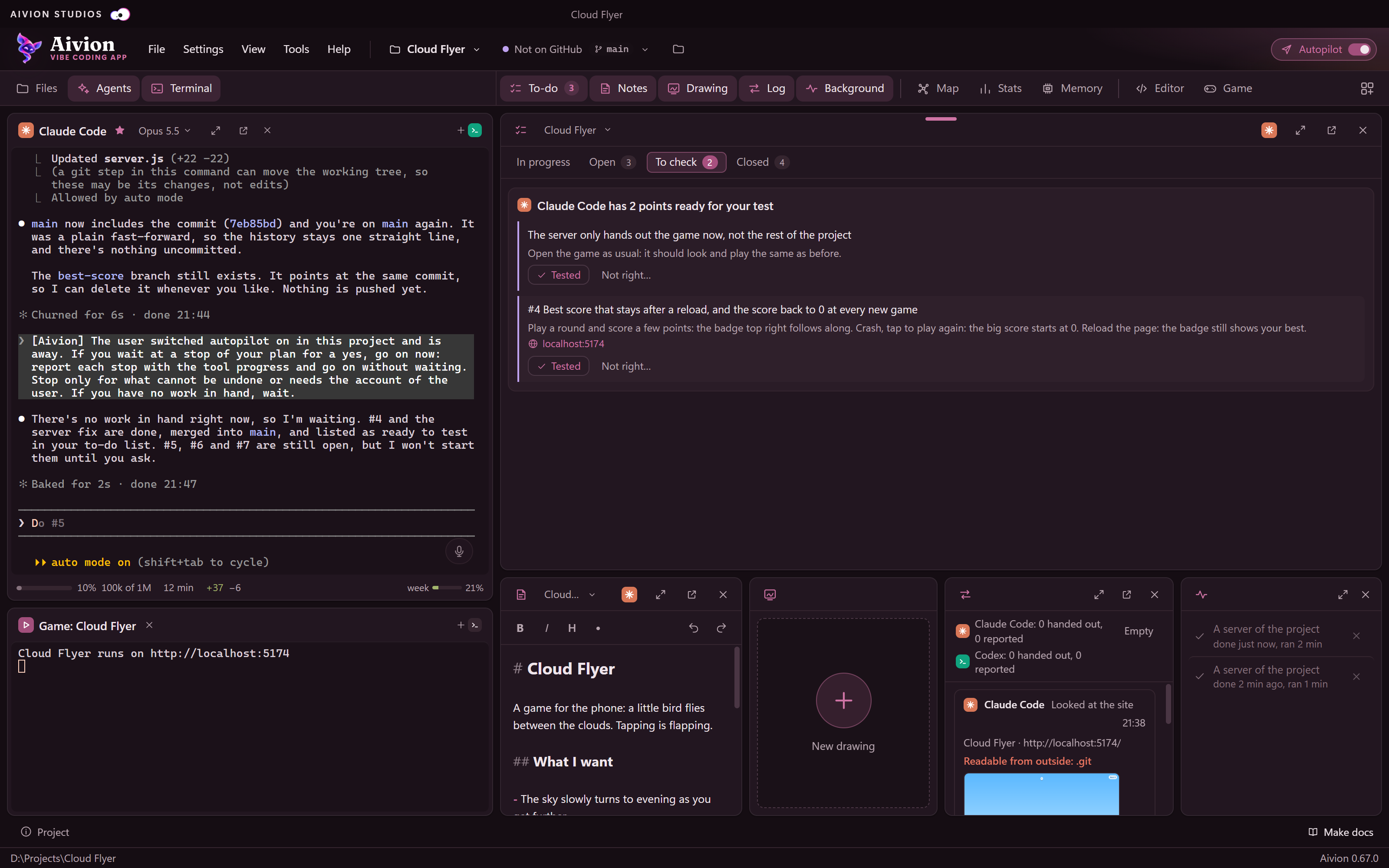
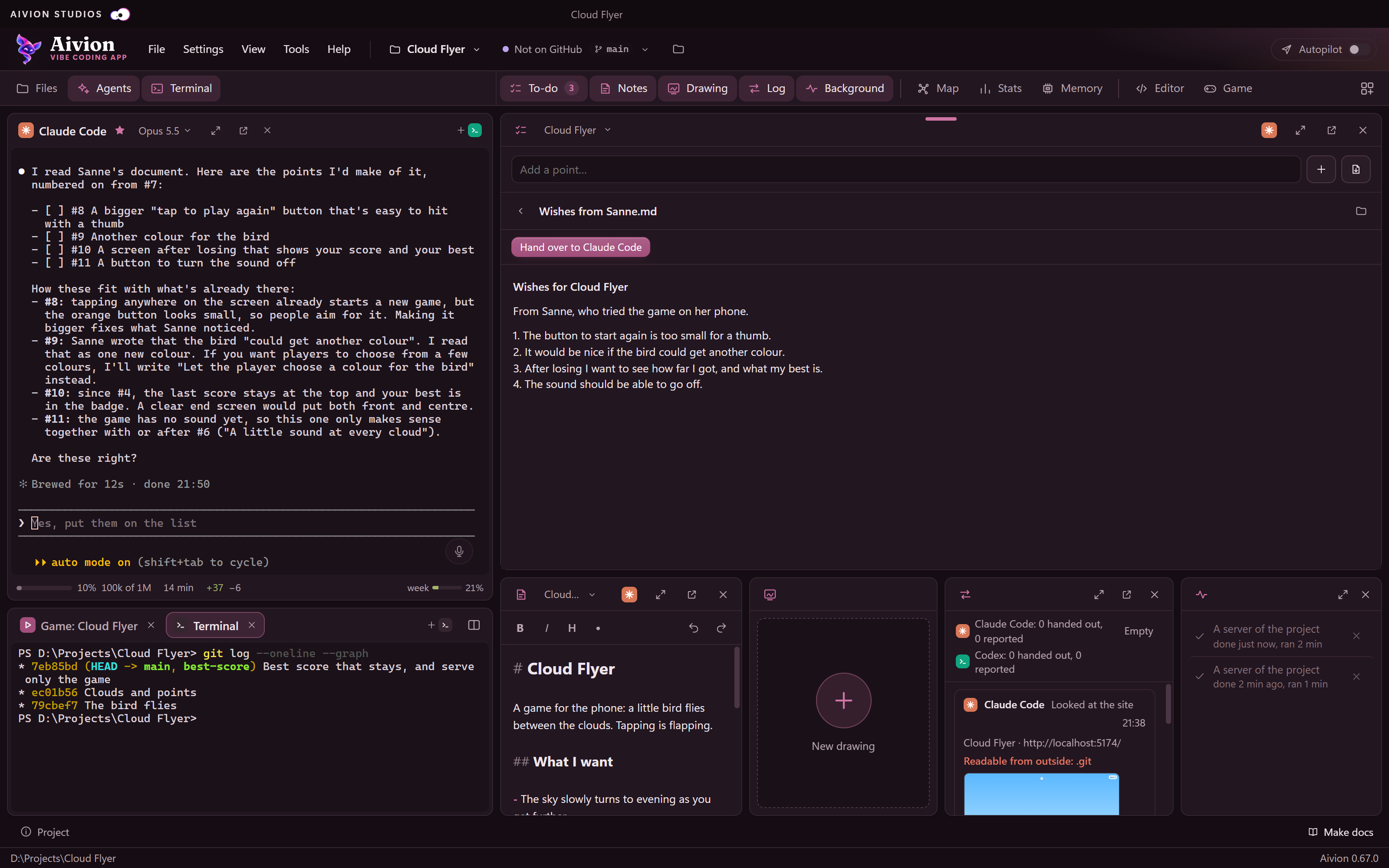
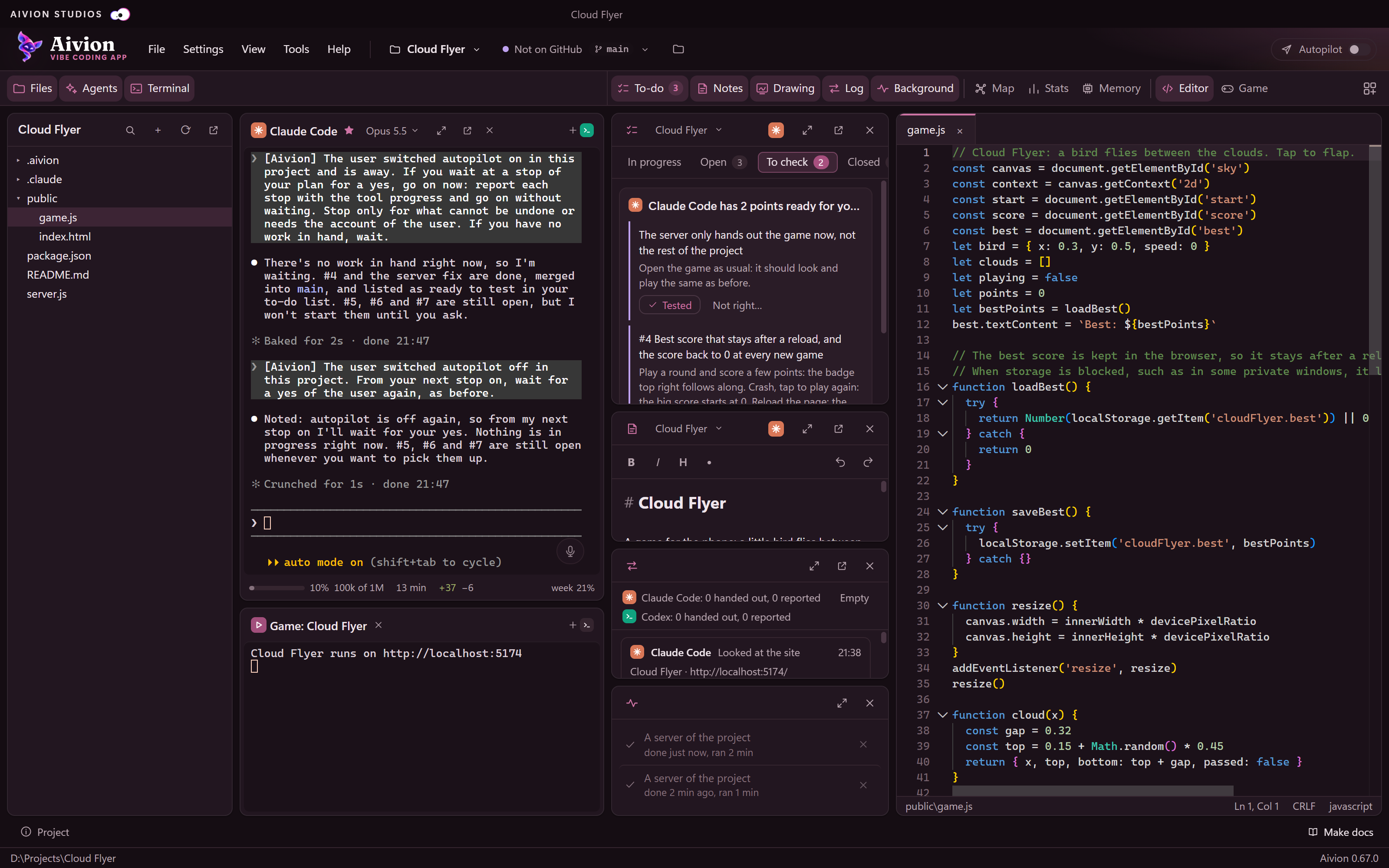
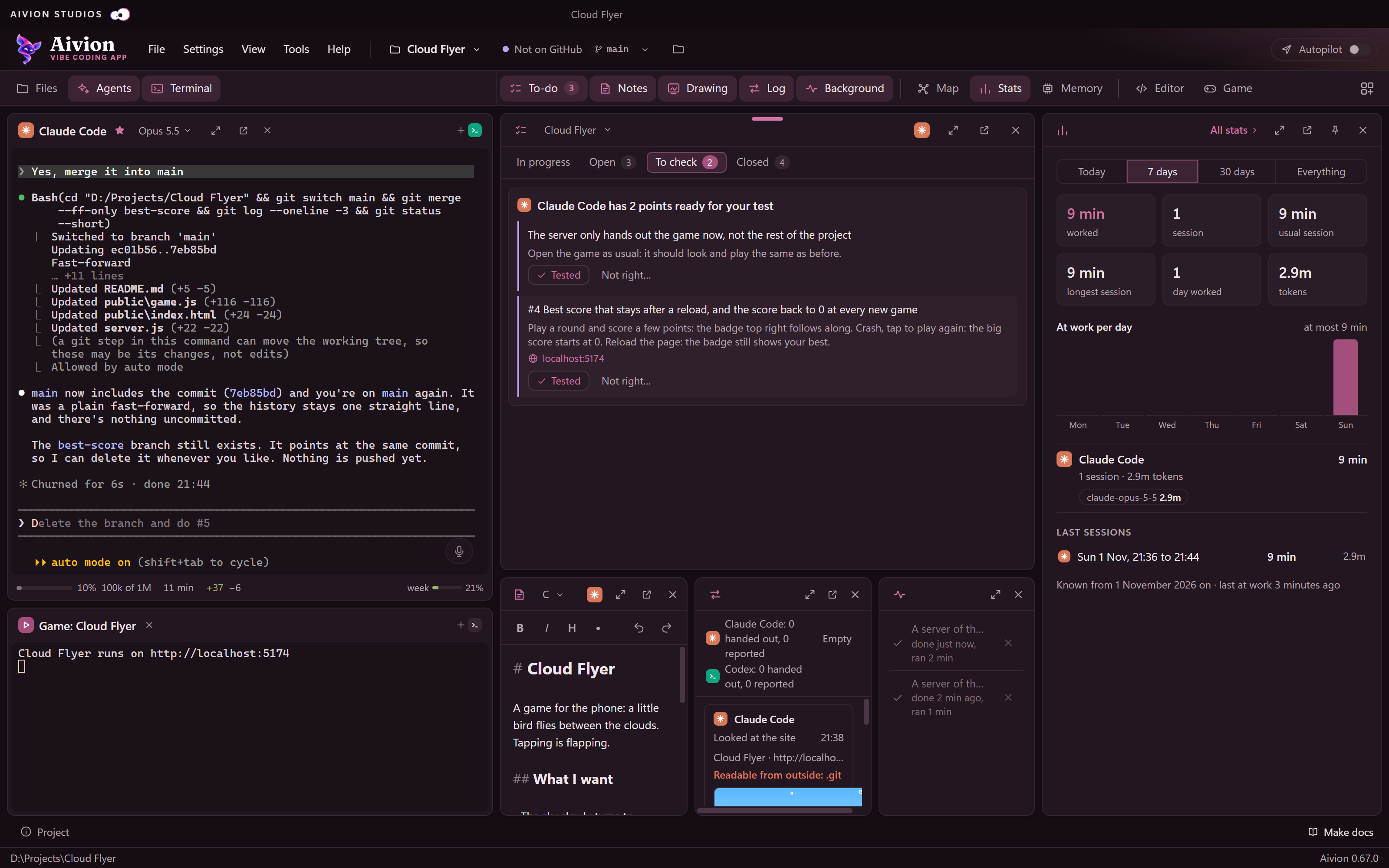
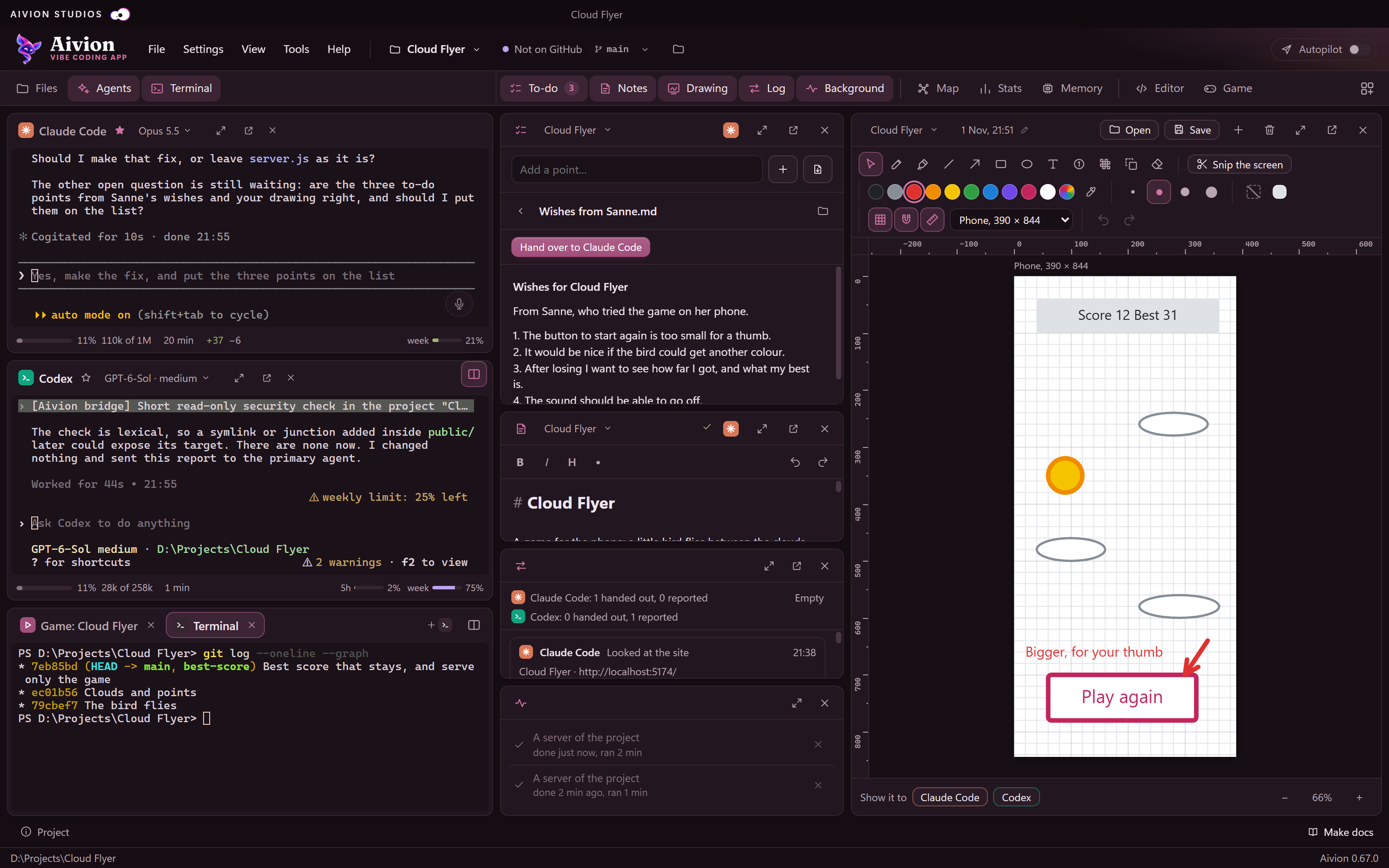
Claude Code and Codex stand at the left, each in a terminal of its own, in your project. At the right is the work: your to-do, your notes, your newest drawing and what the agents handed each other. You read along and steer where you want. The star marks the primary agent Your to-do list beside it, numbered How full the conversation is, and how much of your limit is used
  1. The star marks the primary agent
  2. Your to-do list beside it, numbered
  3. How full the conversation is, and how much of your limit is used

Your agents, with the work beside them

Claude Code and Codex stand at the left, each in a terminal of its own, in your project. At the right is the work: your to-do, your notes, your newest drawing and what the agents handed each other. You read along and steer where you want.
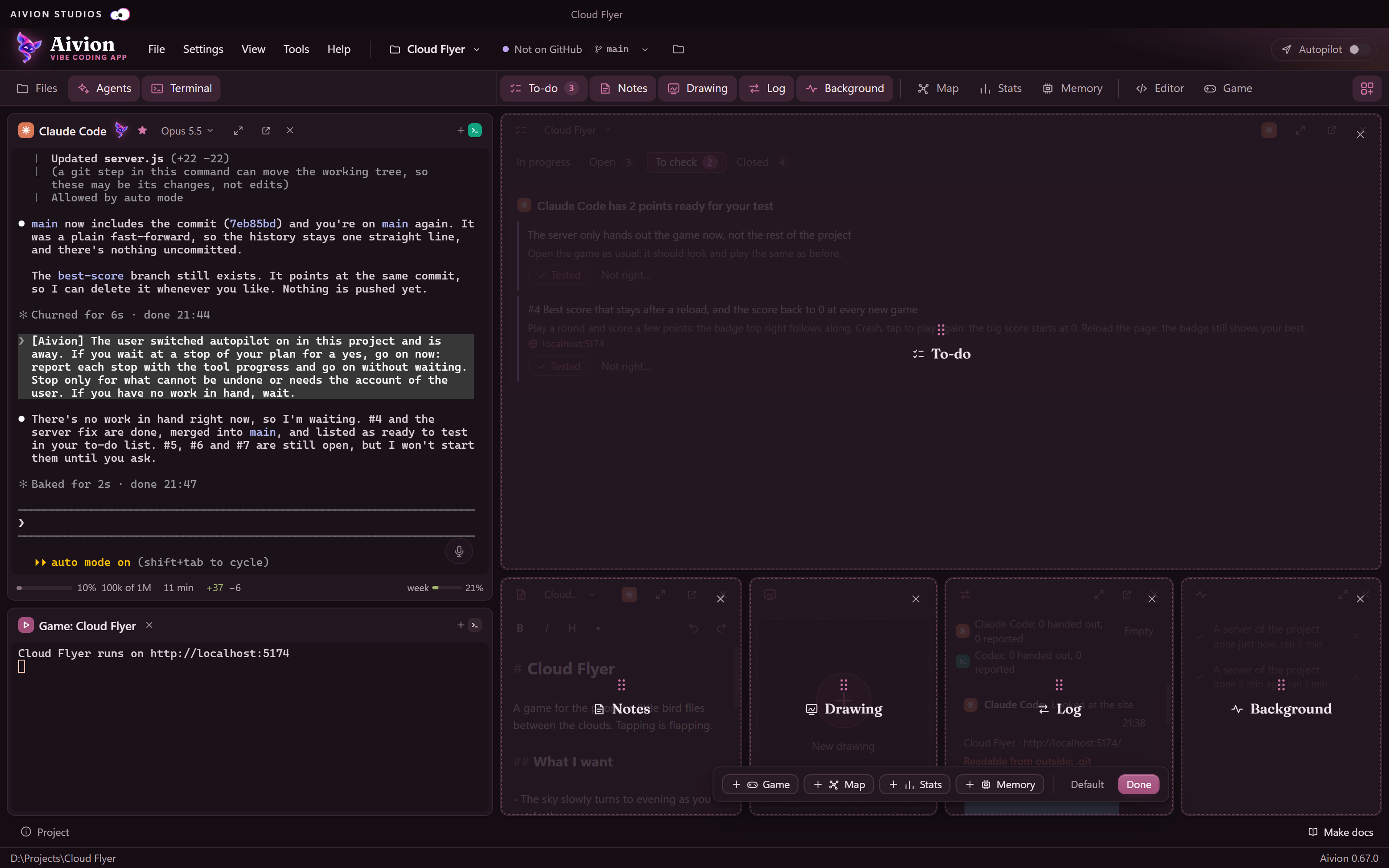
The work is made of cards. Drag them beside, above or below each other, and add the map of your code, your stats, the memory or your game; each project keeps its own layout. An agent or a card goes large over the work, or into a window of its own on a second screen. Drag the cards to their place Add the map of your code, your stats, the memory or your game
  1. Drag the cards to their place
  2. Add the map of your code, your stats, the memory or your game

Laid out your way

The work is made of cards. Drag them beside, above or below each other, and add the map of your code, your stats, the memory or your game; each project keeps its own layout. An agent or a card goes large over the work, or into a window of its own on a second screen.

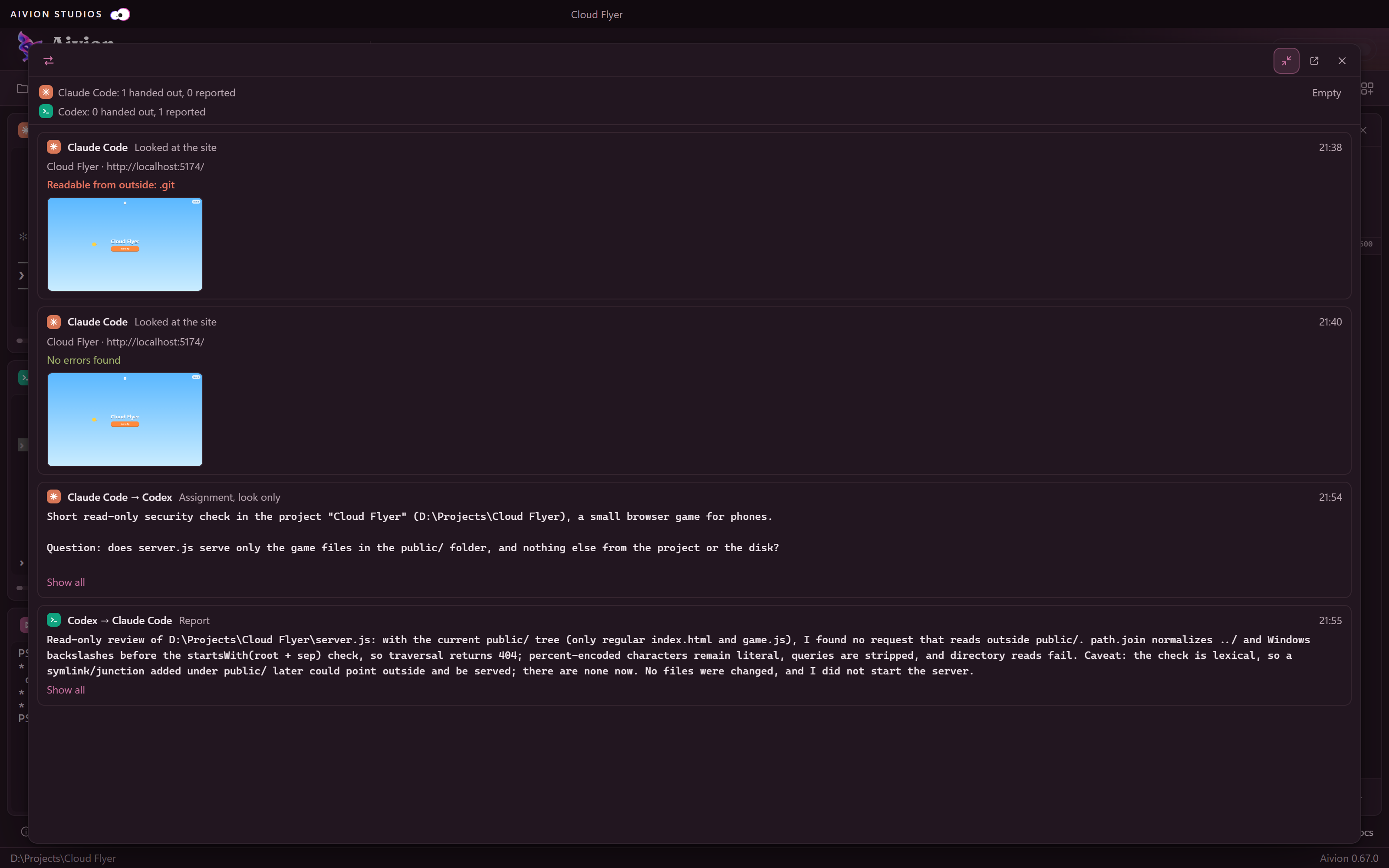
With both, the primary agent hands work to the other. It appears in that agent's terminal, where you read along. The first time in a project, Aivion asks whether that is all right; without an answer the work goes on after 20 seconds, so that it never stands still while you are away. The assignment arrives at Codex, where you read along The log counts what the agents handed each other
  1. The assignment arrives at Codex, where you read along
  2. The log counts what the agents handed each other

Handing over work, in view

With both, the primary agent hands work to the other. It appears in that agent's terminal, where you read along. The first time in a project, Aivion asks whether that is all right; without an answer the work goes on after 20 seconds, so that it never stands still while you are away.

A switch at the top, for when you are away. On, and nothing waits for you: work passes between the agents without a question, and they go on at the stops of their plan. It holds for that one project; off, and you are in control again. While an agent works, your computer does not go to sleep. The switch is on: nothing waits for you Aivion tells the agents, and they go on
  1. The switch is on: nothing waits for you
  2. Aivion tells the agents, and they go on

Autopilot

A switch at the top, for when you are away. On, and nothing waits for you: work passes between the agents without a question, and they go on at the stops of their plan. It holds for that one project; off, and you are in control again. While an agent works, your computer does not go to sleep.

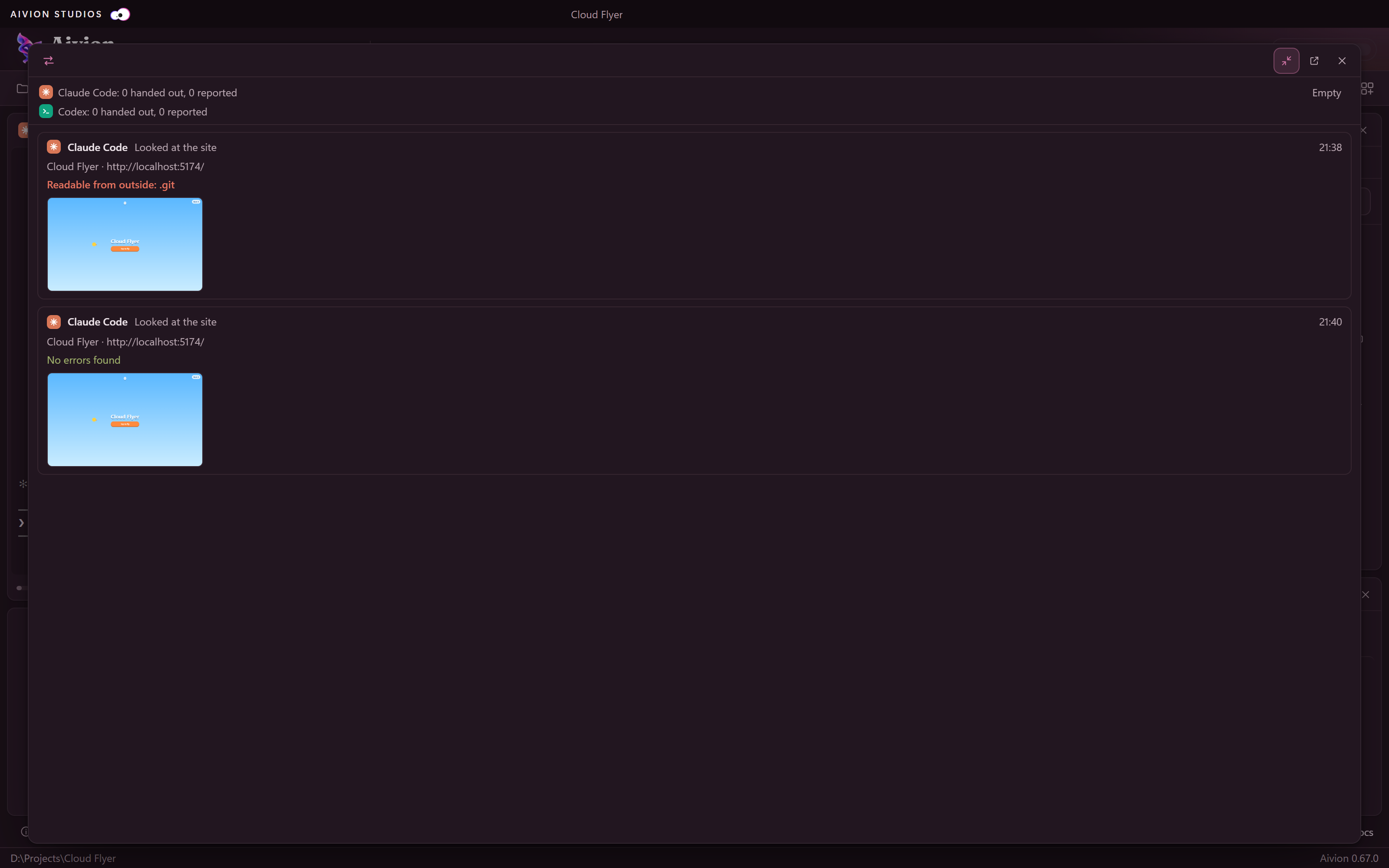
Everything the agents handed each other, and everything that was refused, is in the log of the project. So is every look an agent took at your site, with the picture. The log counts what the agents handed each other The report of Codex, word for word, to read back
  1. The log counts what the agents handed each other
  2. The report of Codex, word for word, to read back

Log

Everything the agents handed each other, and everything that was refused, is in the log of the project. So is every look an agent took at your site, with the picture.

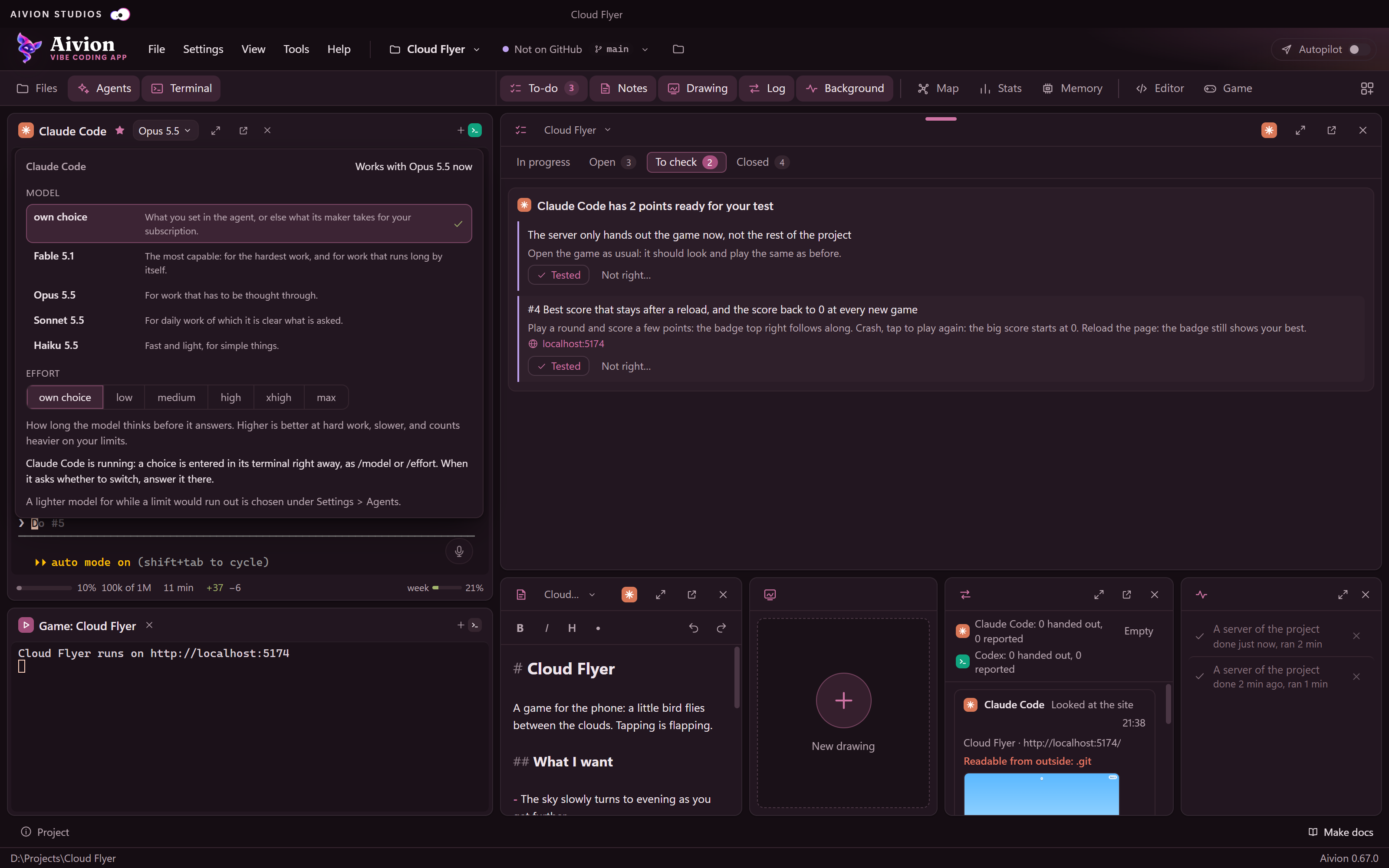
Choose the model per agent, and how deeply it thinks before it answers: next to its name, also in the middle of a conversation. Its head shows the model it works with now, with the version, such as Opus 5.5. When a limit is about to run out, Aivion can take a lighter model at the start, and says so. Pick the model per agent, in the middle of a conversation And how hard it thinks: from low to max
  1. Pick the model per agent, in the middle of a conversation
  2. And how hard it thinks: from low to max

Model and effort

Choose the model per agent, and how deeply it thinks before it answers: next to its name, also in the middle of a conversation. Its head shows the model it works with now, with the version, such as Opus 5.5. When a limit is about to run out, Aivion can take a lighter model at the start, and says so.

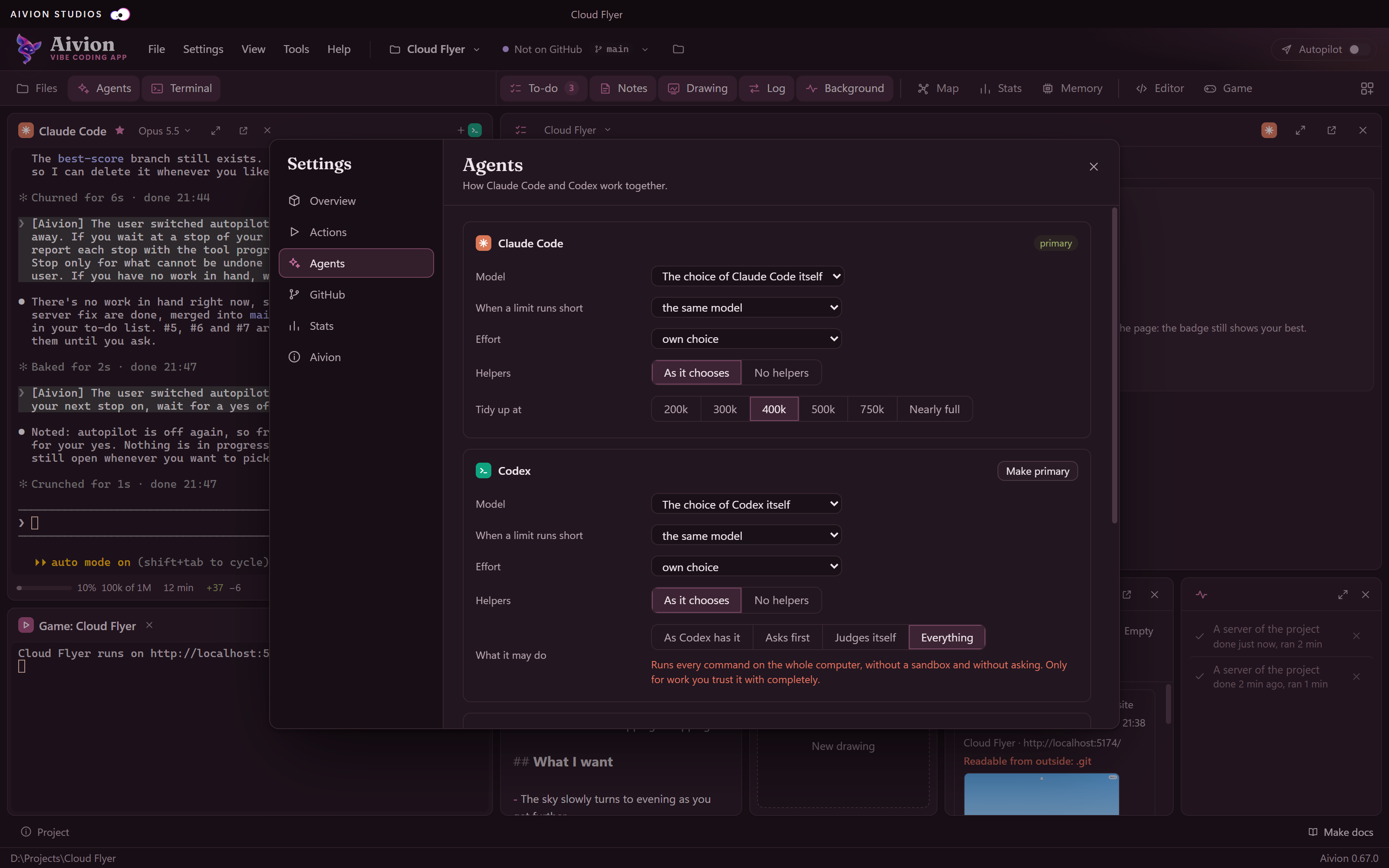
Claude Code and Codex sometimes put helpers to work on part of the job themselves. The tab of the agent shows how many are busy, and since when. Rather not? Start an agent without helpers: that takes longer and uses less of your plan. As it chooses, or without helpers: per agent
  1. As it chooses, or without helpers: per agent

Helpers

Claude Code and Codex sometimes put helpers to work on part of the job themselves. The tab of the agent shows how many are busy, and since when. Rather not? Start an agent without helpers: that takes longer and uses less of your plan.

Sign in with your own account

Sign in to Claude, to ChatGPT for Codex, or to both. The page of the maker opens in your browser; your password never enters Aivion.

Dictation

Click the microphone next to Claude Code, speak your request, and click again.

N° 02Projects

All your work. In order.

Projects in groups and how each one is, with GitHub at hand, an eye on your secrets and vulnerabilities, and docs that explain how it works.

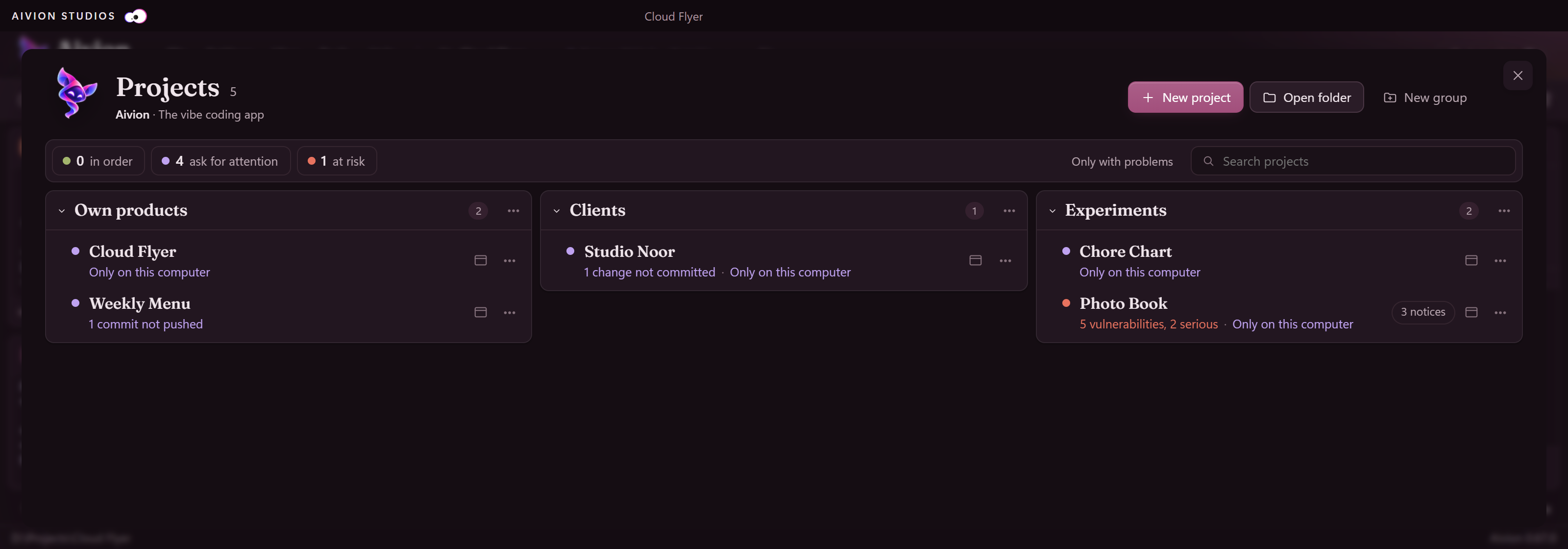
All your projects in one list, in groups as deep as you like. Under each name is what goes on in it, the most serious first: changes not yet committed, commits not yet on GitHub, updates to weigh, vulnerabilities, keys at risk and docs behind the code. At the top you see how many projects are in order, ask for attention or are at risk. A group orders the list; your folders stay where they are.

All your projects, and how they are

All your projects in one list, in groups as deep as you like. Under each name is what goes on in it, the most serious first: changes not yet committed, commits not yet on GitHub, updates to weigh, vulnerabilities, keys at risk and docs behind the code. At the top you see how many projects are in order, ask for attention or are at risk. A group orders the list; your folders stay where they are.

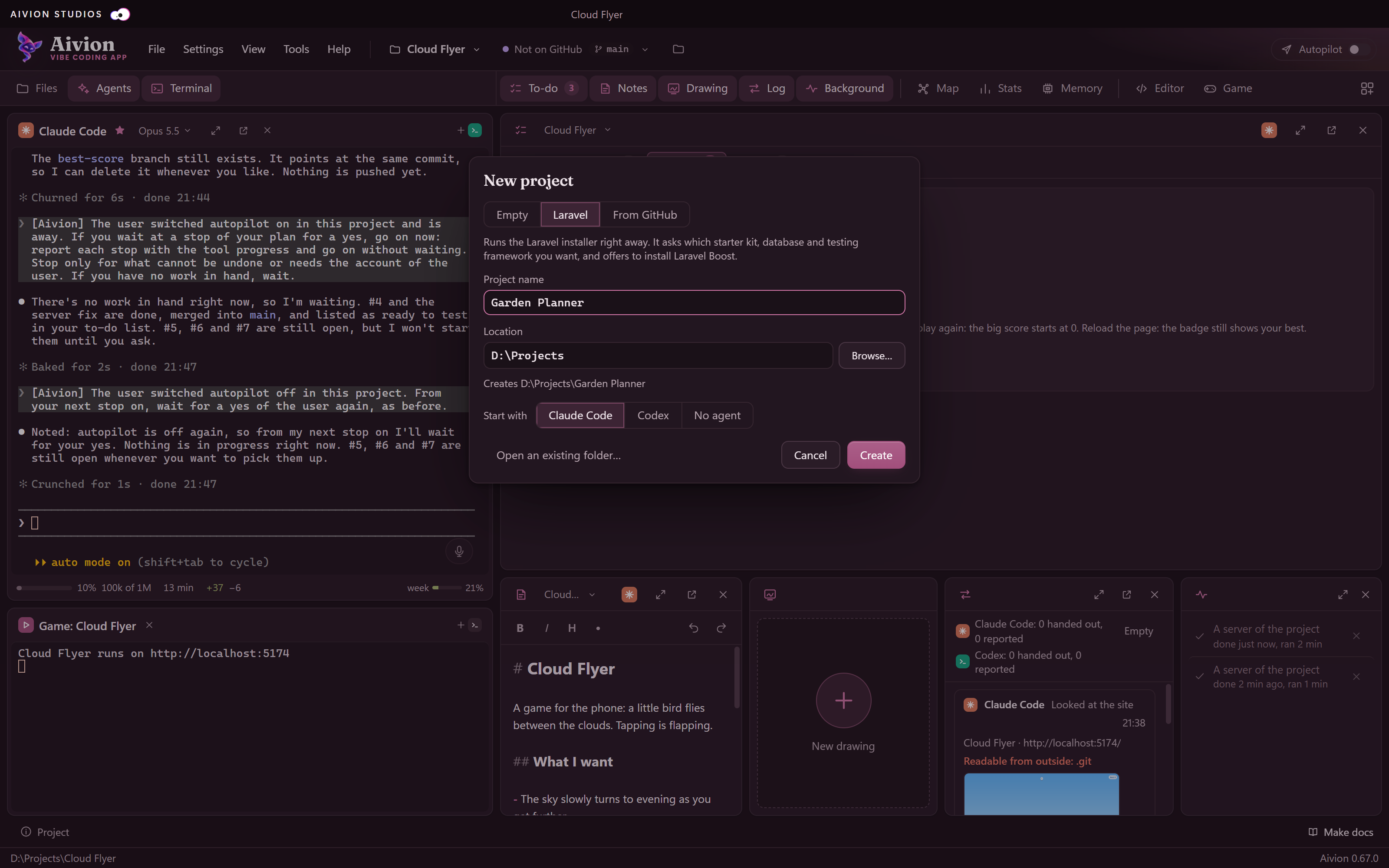
Start a new project, open an existing folder, or clone a repository from GitHub. Give a project a name of its own if you like, and open several projects at once, each in a window of its own. A new Laravel project: the installer starts right away Choose which agent the project starts with
  1. A new Laravel project: the installer starts right away
  2. Choose which agent the project starts with

Starting a project

Start a new project, open an existing folder, or clone a repository from GitHub. Give a project a name of its own if you like, and open several projects at once, each in a window of its own.

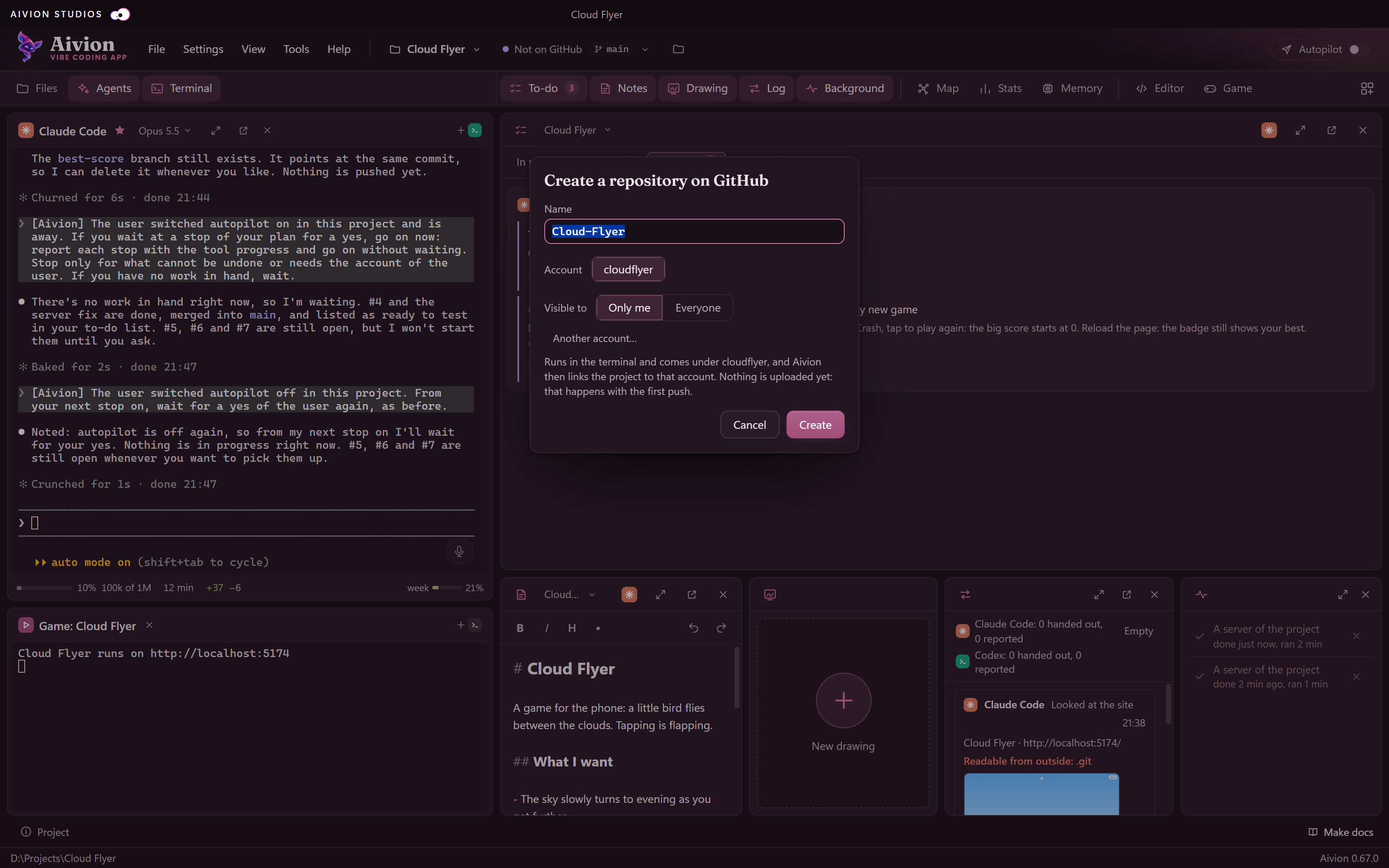
See in the bar whether your project is on GitHub, and with which account. Connect it to a repository, create one under the account you choose, or disconnect it, without leaving Aivion. Each project goes to GitHub with the account that owns its repository, and before a push the agents ask Aivion whether that is right. Choose the account, and who may see it Nothing is uploaded until your first push
  1. Choose the account, and who may see it
  2. Nothing is uploaded until your first push

GitHub

See in the bar whether your project is on GitHub, and with which account. Connect it to a repository, create one under the account you choose, or disconnect it, without leaving Aivion. Each project goes to GitHub with the account that owns its repository, and before a push the agents ask Aivion whether that is right.

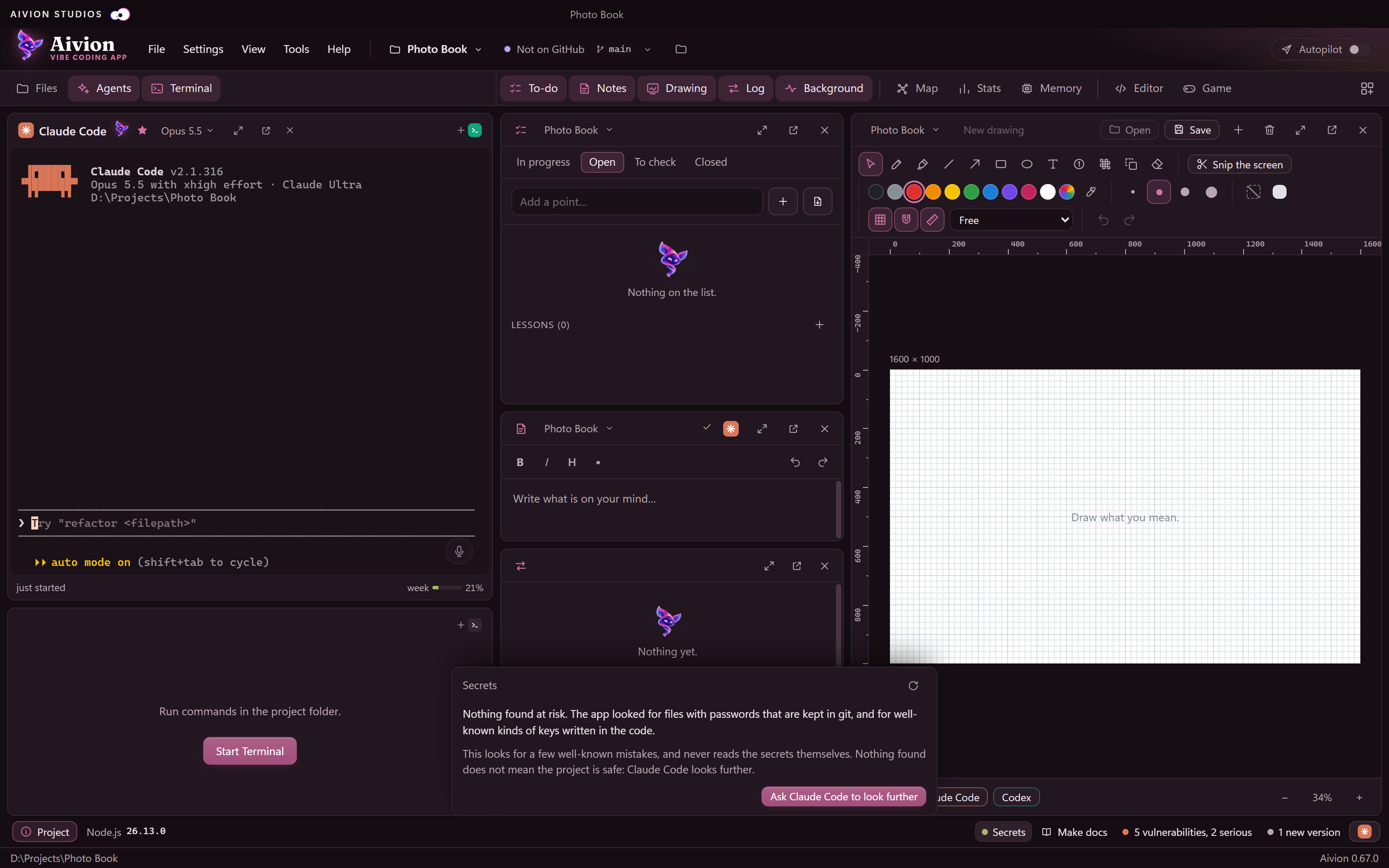
Aivion looks whether passwords and keys would go along to GitHub, without reading them itself. An agent then looks further, if you want it to. Aivion spots passwords and keys that would go along with git The bar at the bottom warns you at once
  1. Aivion spots passwords and keys that would go along with git
  2. The bar at the bottom warns you at once

Secrets

Aivion looks whether passwords and keys would go along to GitHub, without reading them itself. An agent then looks further, if you want it to.

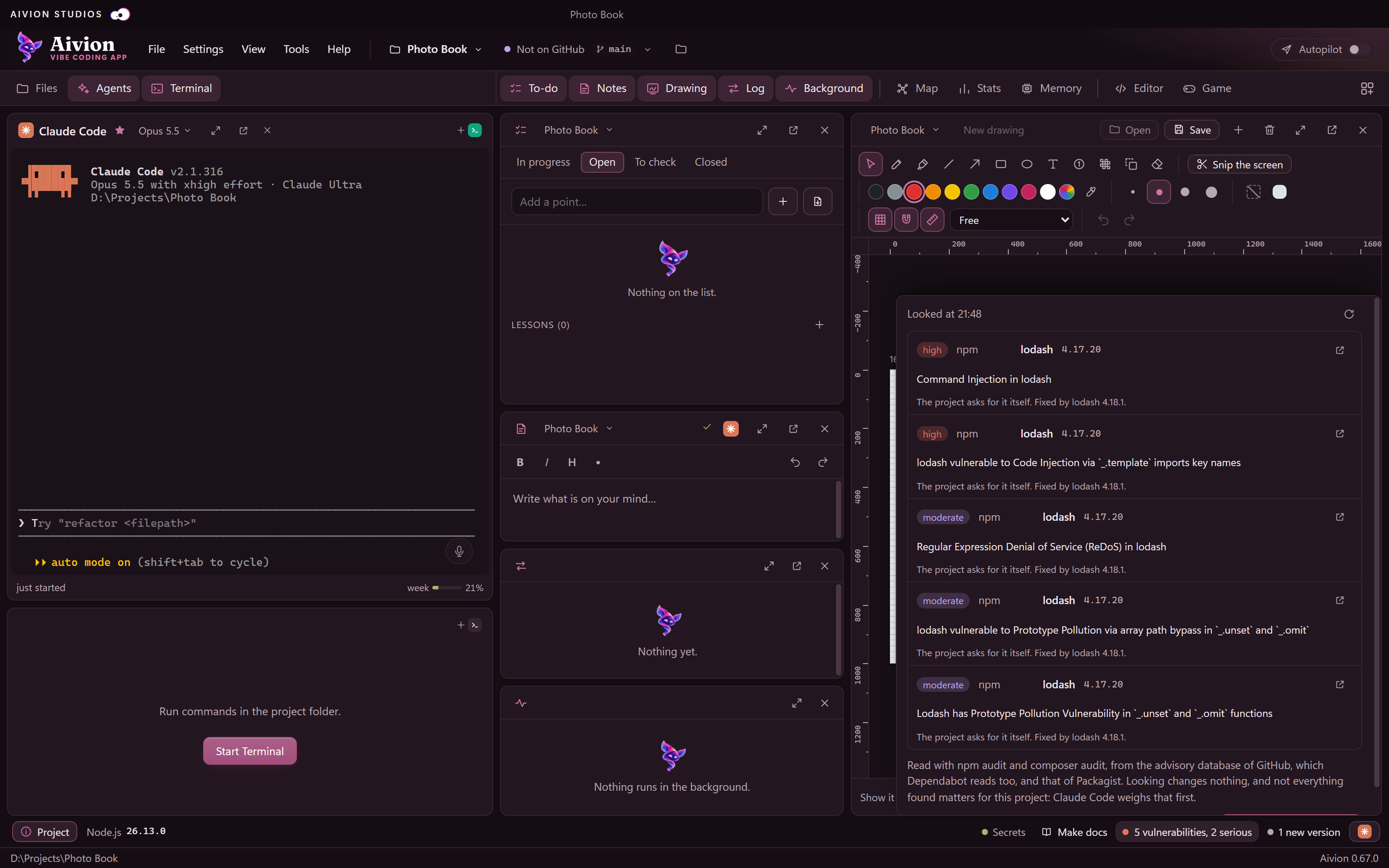
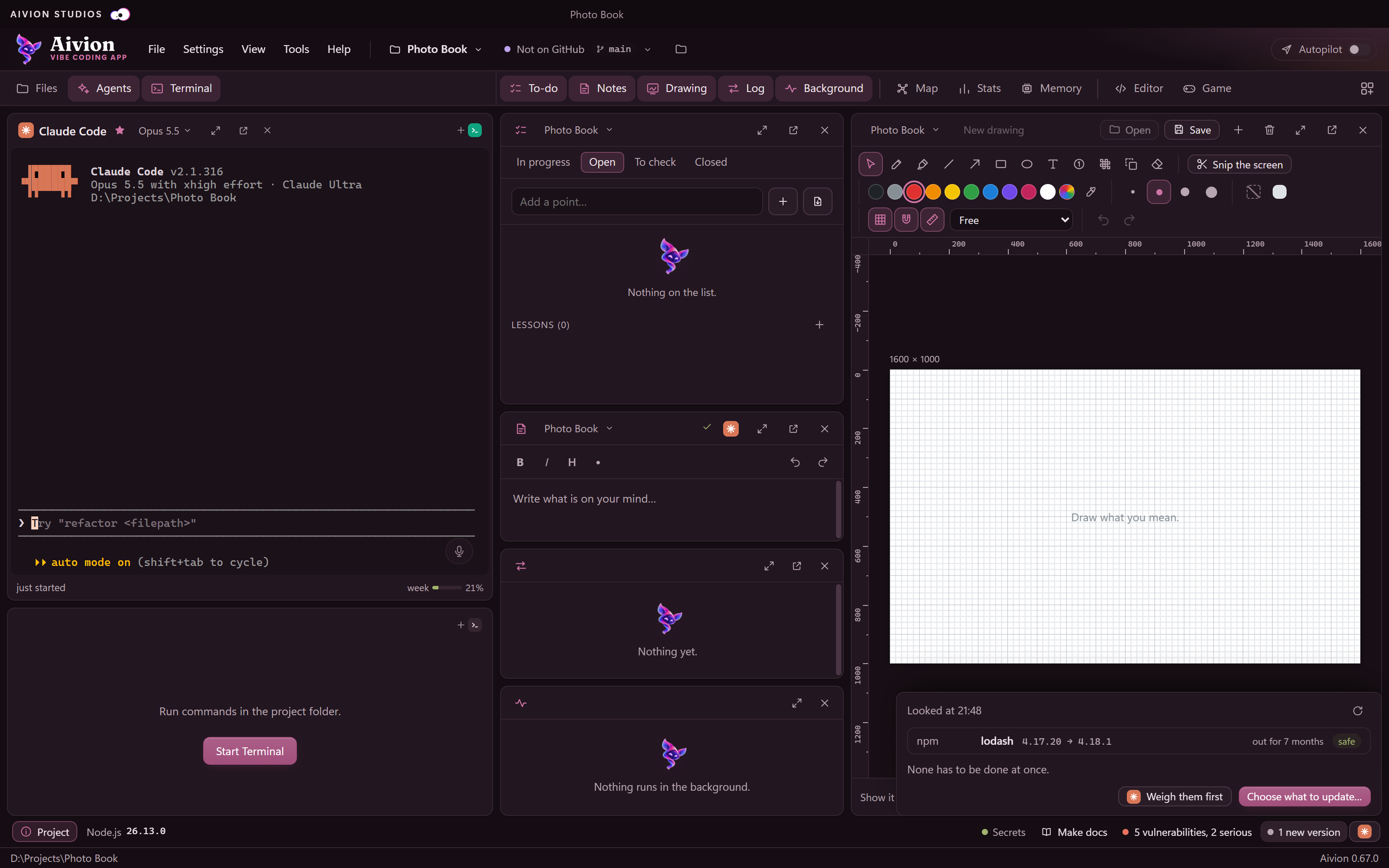
Aivion looks for known vulnerabilities in the packages of your project itself, with npm audit and composer audit, also in packages that come in through another package. The bar of the project names them, and says so when a serious one is among them. One click and the agent makes a plan; it changes nothing before your yes. No GitHub account is needed for it. Each notice with how serious it is, and which version fixes it At the bottom you see at once how many there are
  1. Each notice with how serious it is, and which version fixes it
  2. At the bottom you see at once how many there are

Vulnerabilities

Aivion looks for known vulnerabilities in the packages of your project itself, with npm audit and composer audit, also in packages that come in through another package. The bar of the project names them, and says so when a serious one is among them. One click and the agent makes a plan; it changes nothing before your yes. No GitHub account is needed for it.

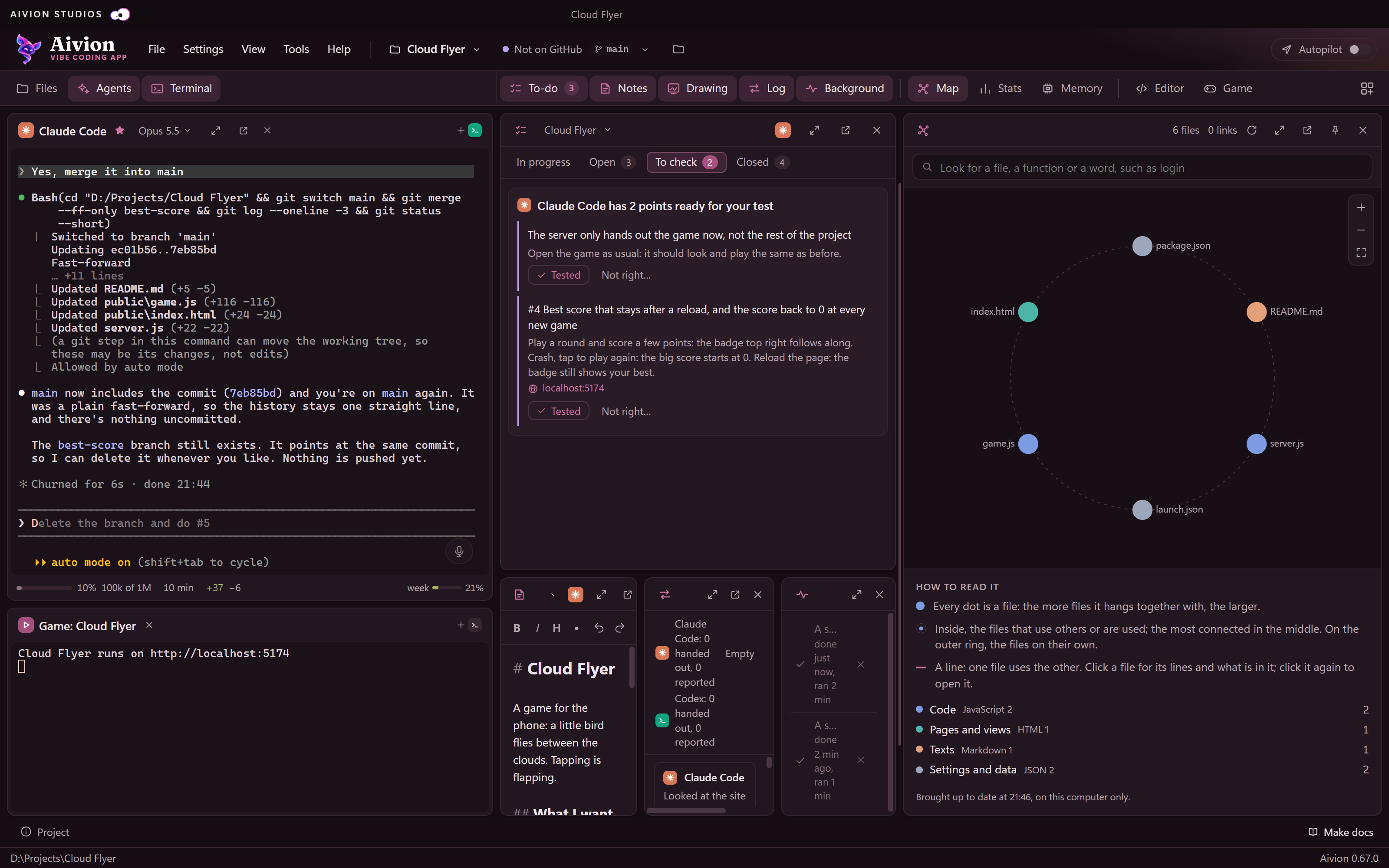
Aivion keeps a map of the code of each project: per file what is in it, and which files use which. The agents ask the map where something is before they search themselves. Under Map you see it: every file a dot, every link a line. Look for a file or a function, and open it with a click. The map holds names, never code, and stays on your computer. Every file a dot; the larger, the more it hangs together Look for a file, a function or a word
  1. Every file a dot; the larger, the more it hangs together
  2. Look for a file, a function or a word

Map of your code

Aivion keeps a map of the code of each project: per file what is in it, and which files use which. The agents ask the map where something is before they search themselves. Under Map you see it: every file a dot, every link a line. Look for a file or a function, and open it with a click. The map holds names, never code, and stays on your computer.

Docs of your project

With one click your agent writes docs for your project: what it does and how it is made, plain words first, the technique beneath. You read them in your browser, at docs.aivion.test. The bar tells when the code has moved on from the docs, and a click has the agent bring them up to date. They stay on your computer, out of git.

N° 03Planning

Write it down. Or draw it.

Notes, a to-do list and a drawing board per project. Your agents read along, make a plan first, and have it ready for you to test.

Write it down. It happens.

Put your ideas in your notes. Your agent carries them out, and notes what is done.

Draw it. There it is.

Sketch what you mean on the drawing board. Your agent looks at your drawing and builds it that way.

Your list. Ticked off.

Your agent reads along, asks first, and ticks off what is done.

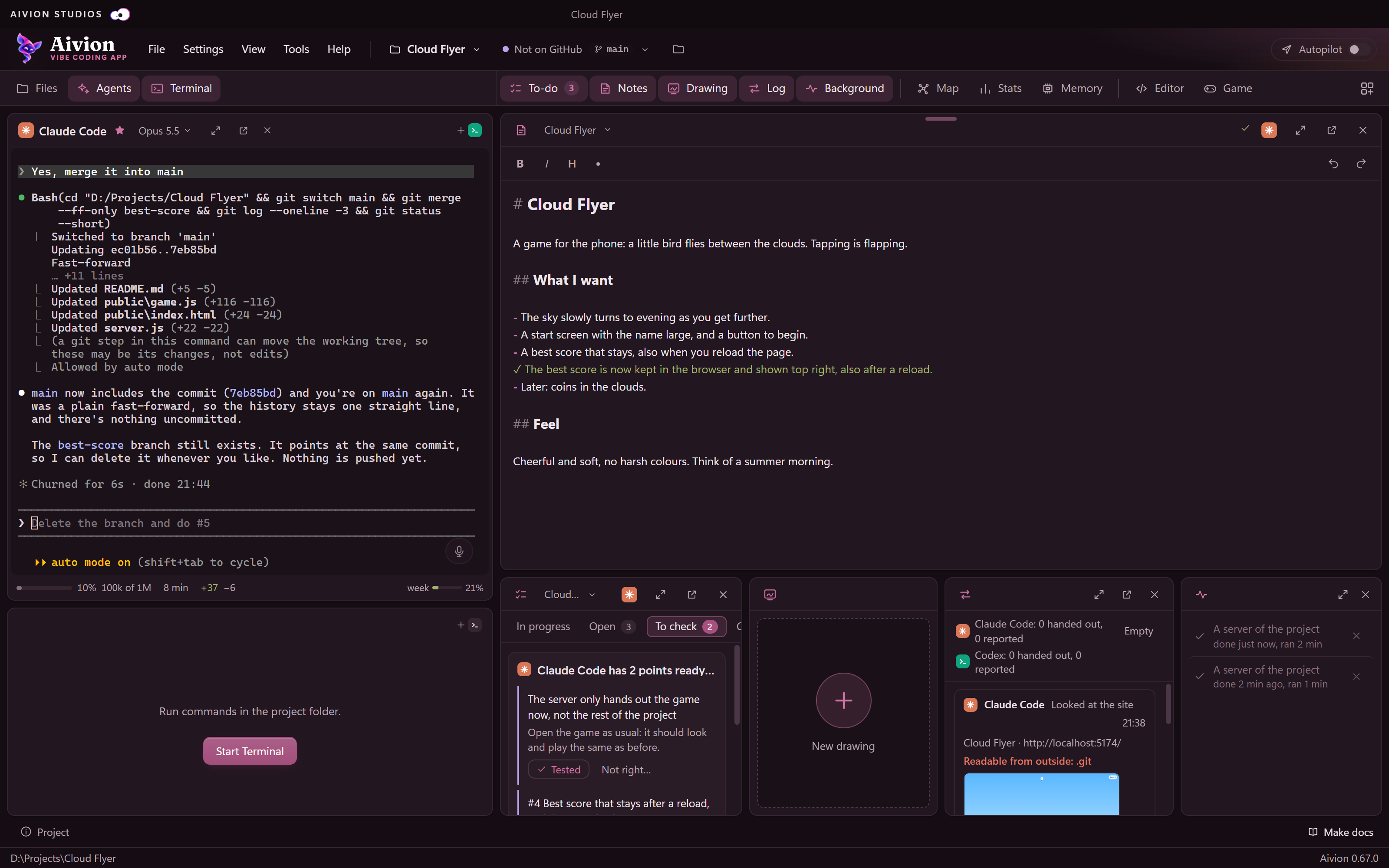
Write down ahead what you want, with formatting and pictures. The agent carries out a point and adds a green ✓ line under it; your own text it leaves alone. The agent adds a tick under what it did Your to-do list beside it; what is ready to test is under To check
  1. The agent adds a tick under what it did
  2. Your to-do list beside it; what is ready to test is under To check

Notes

Write down ahead what you want, with formatting and pictures. The agent carries out a point and adds a green ✓ line under it; your own text it leaves alone.

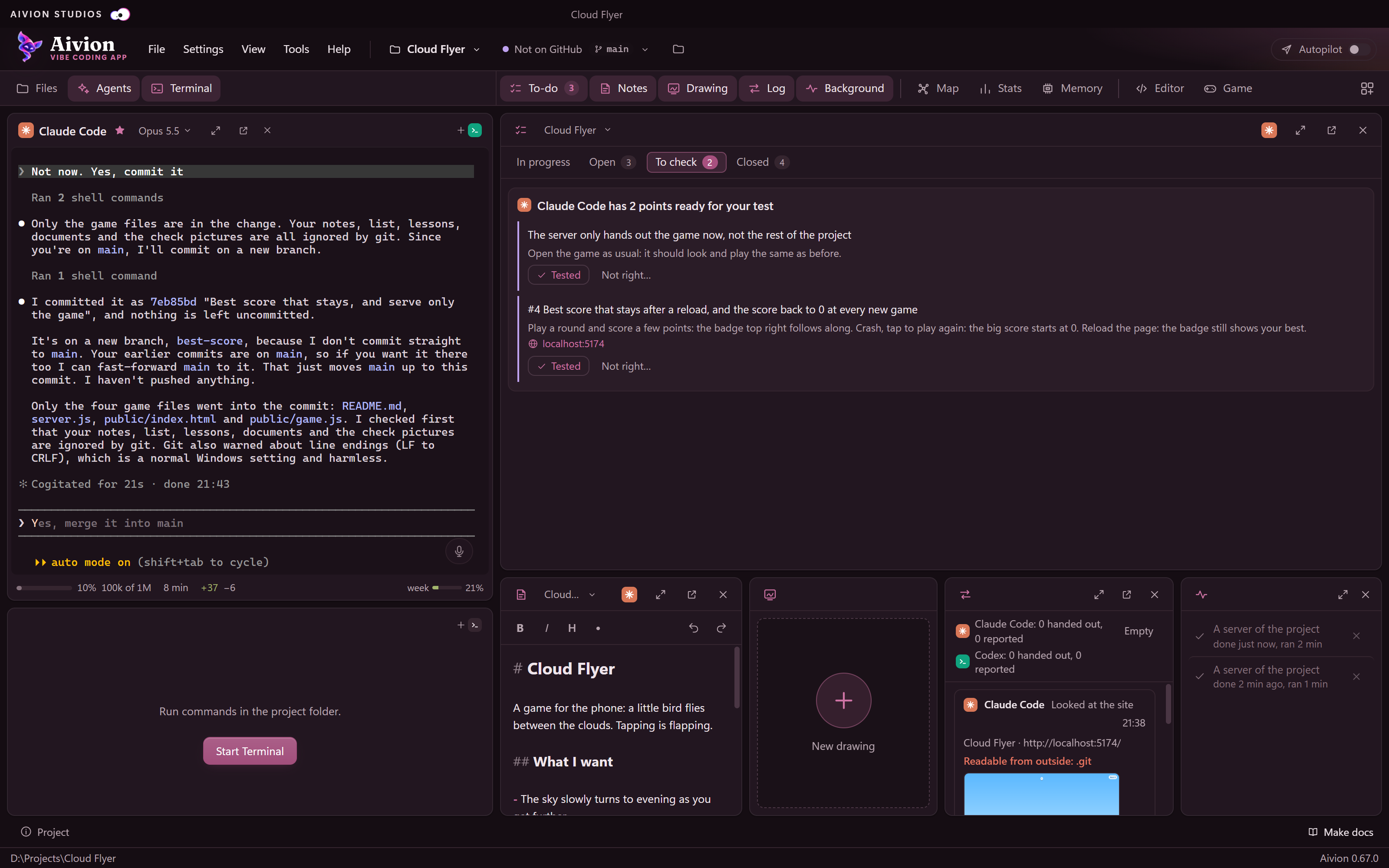
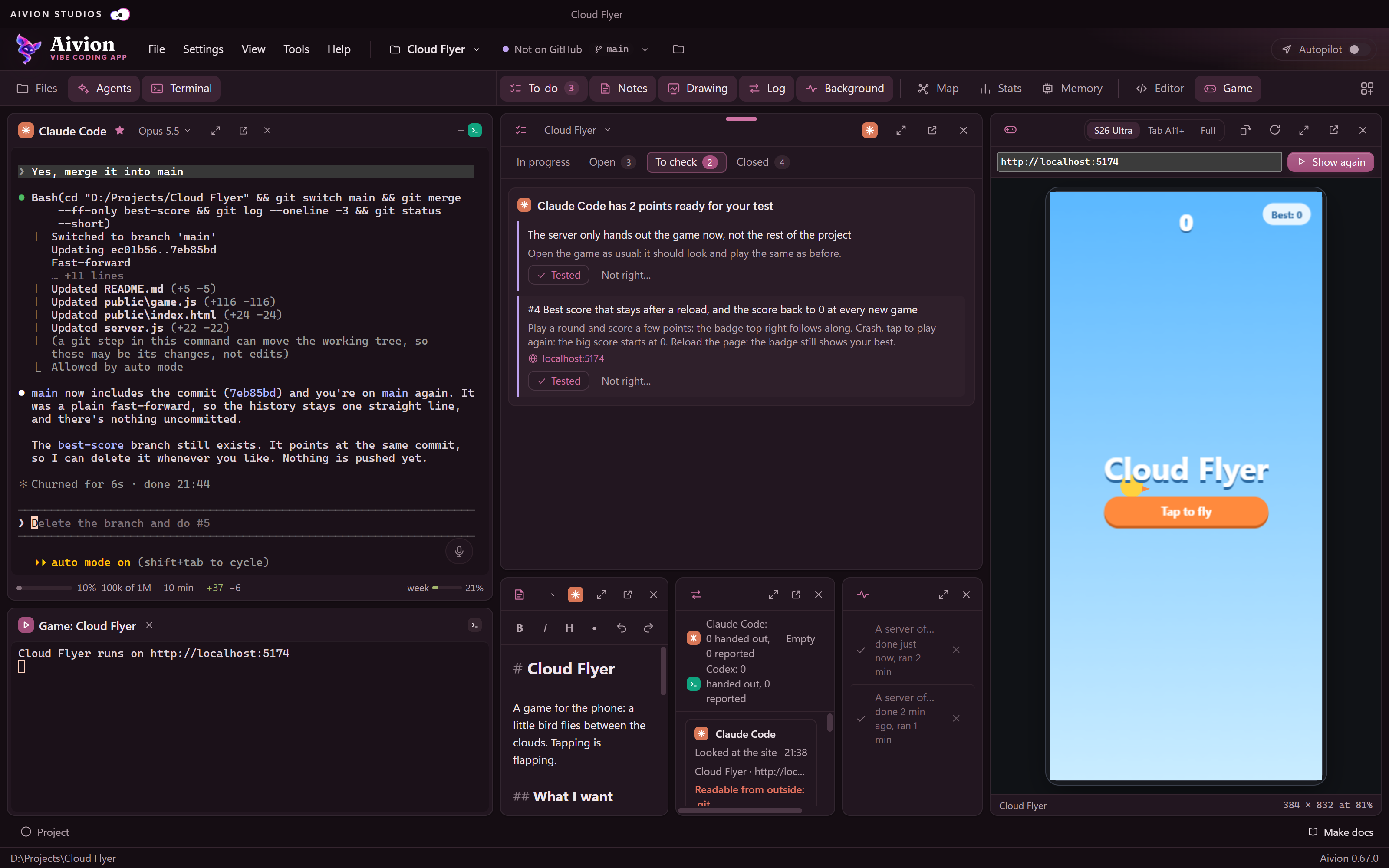
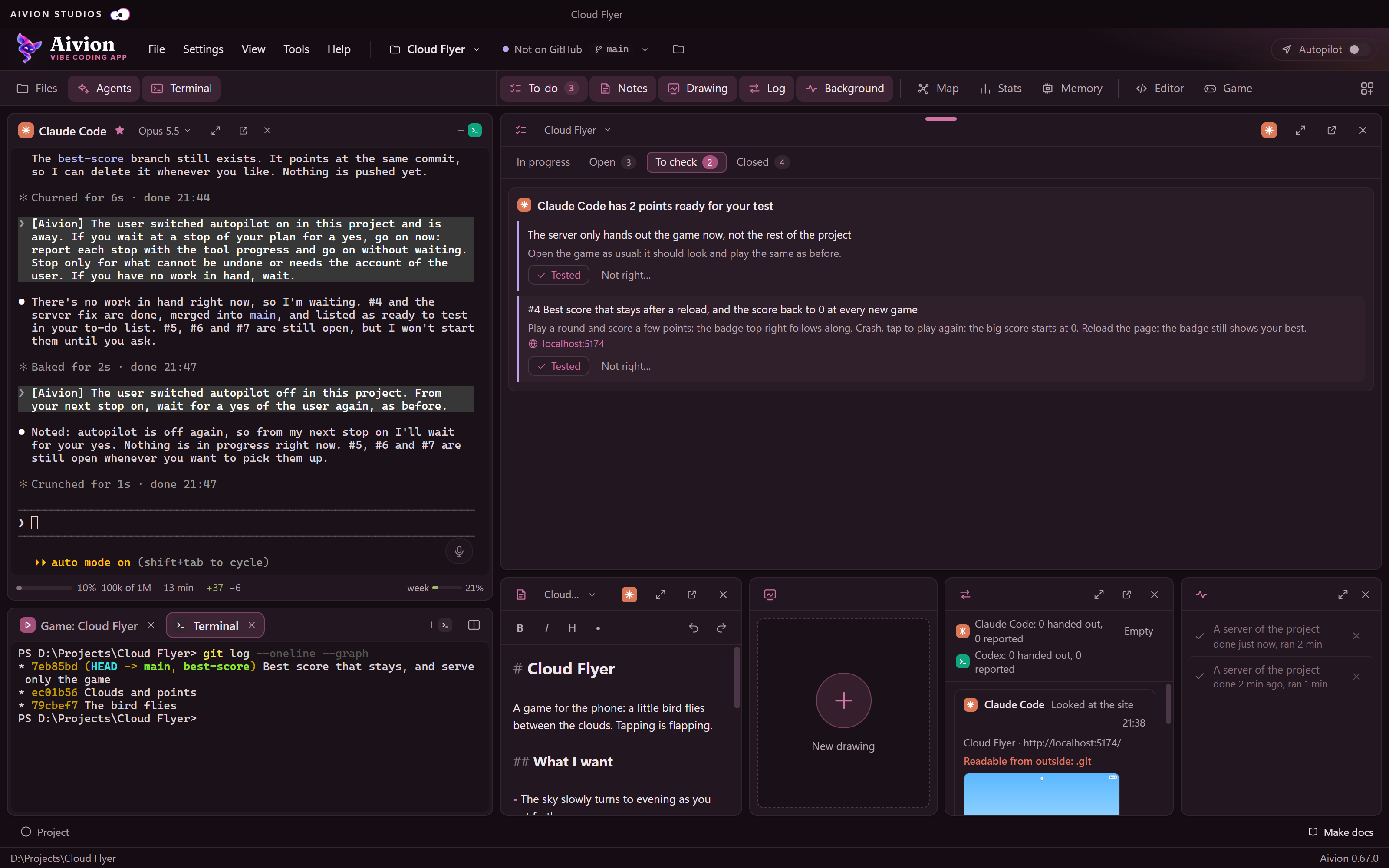
A numbered list that you and the agents add points to, with the tabs In progress, Open, To check and Closed. Say "do #4", or hand the agent the whole list: it tells its plan first and stops along the way, so that you can test. To check shows what is ready, and how to test it; Tested takes it away, Not right tells the agent what you saw. Drag points into the order you want. The agent sets out what you test, and how Tested, or say what is not right
  1. The agent sets out what you test, and how
  2. Tested, or say what is not right

To-do

A numbered list that you and the agents add points to, with the tabs In progress, Open, To check and Closed. Say "do #4", or hand the agent the whole list: it tells its plan first and stops along the way, so that you can test. To check shows what is ready, and how to test it; Tested takes it away, Not right tells the agent what you saw. Drag points into the order you want.

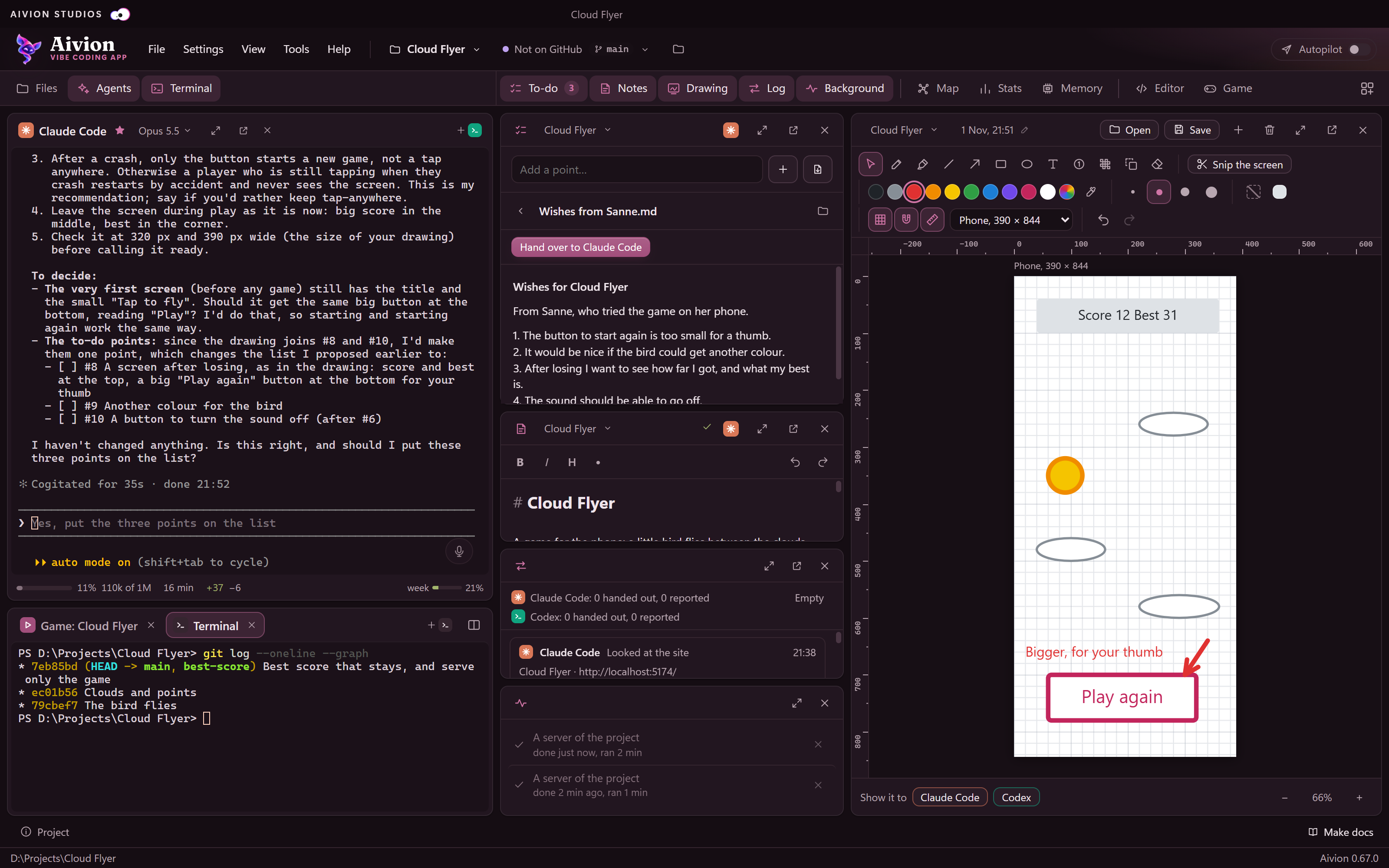
A list of wishes in a Word file or a PDF need not be typed over: put it in the to-do. The agent makes numbered points of it, and asks whether they are right; only after your yes do they go on the list. What a document says, it never carries out as a command. Sanne's document, right in the to-do The agent makes points of it, and asks whether they are right
  1. Sanne's document, right in the to-do
  2. The agent makes points of it, and asks whether they are right

Documents

A list of wishes in a Word file or a PDF need not be typed over: put it in the to-do. The agent makes numbered points of it, and asks whether they are right; only after your yes do they go on the list. What a document says, it never carries out as a command.

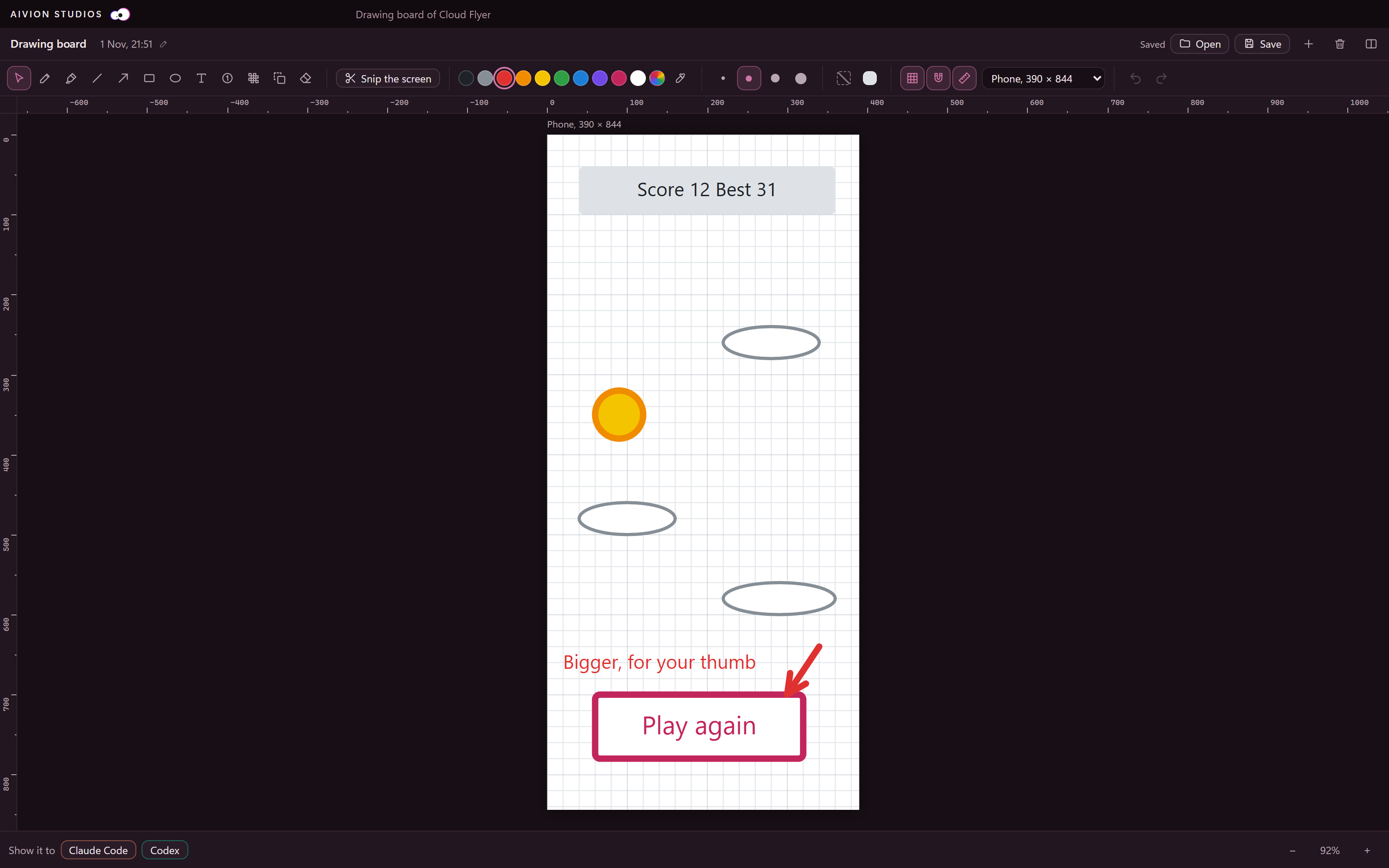
Draw what you mean, like the layout of a page or a logo, and show it to an agent with one click. Snip a part of your screen or paste a screenshot, and draw over it. Put numbered dots on what you mean, and blur a password or an e-mail address: the picture itself changes, so the agent never sees it. Give a drawing a name, and open it again later. Draw what you mean; the agent reads it One click shows the drawing to Claude Code or Codex
  1. Draw what you mean; the agent reads it
  2. One click shows the drawing to Claude Code or Codex

Drawing board

Draw what you mean, like the layout of a page or a logo, and show it to an agent with one click. Snip a part of your screen or paste a screenshot, and draw over it. Put numbered dots on what you mean, and blur a password or an e-mail address: the picture itself changes, so the agent never sees it. Give a drawing a name, and open it again later.

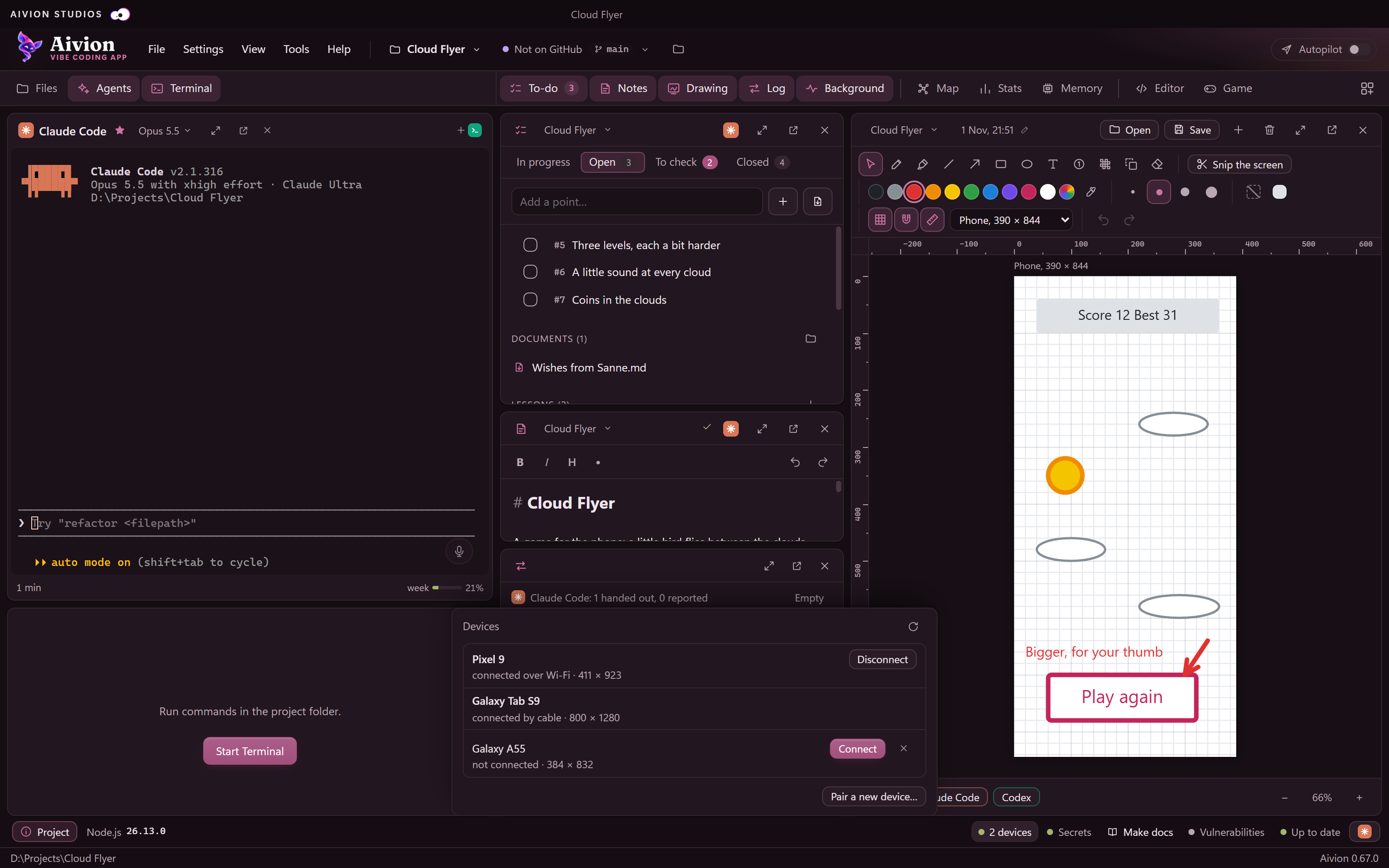
Put the board in a window of its own, for example on a second screen; an agent, the map, your files, notes, to-do and the other cards of the work can go there too. Draw to the size of a phone, tablet or desktop, with a grid, rulers and a pipette. Pen, marker, line, arrow, box, oval, text and eraser Draw to the size of a phone, tablet or desktop Point at what you mean; the agent reads the shapes and the words One click and the agent takes a look
  1. Pen, marker, line, arrow, box, oval, text and eraser
  2. Draw to the size of a phone, tablet or desktop
  3. Point at what you mean; the agent reads the shapes and the words
  4. One click and the agent takes a look

On a second screen

Put the board in a window of its own, for example on a second screen; an agent, the map, your files, notes, to-do and the other cards of the work can go there too. Draw to the size of a phone, tablet or desktop, with a grid, rulers and a pipette.

Lessons, and a second look

Say a point is not right, and the agent puts it right and writes down what would have kept it from happening. The agents take those lessons into every new conversation; you see them under the to-do, and change them. With Claude Code and Codex both, one can check the work of the other before it is ready to test.

Stays on your computer

Aivion keeps notes, to-do, lessons, drawings, documents and docs out of git: they do not go along to GitHub or to a server.

N° 04Build and try

See it. Try it.

Your project next to the conversation, on your own phone, and in the editor when you want to change something yourself.

Your site or game runs next to the conversation, in the size of a phone, a tablet or a full screen. Or in a window of its own. Your site is in your browser too, at an address like yourproject.test. Your site or game as it looks on a phone Switch between phone, tablet and full screen
  1. Your site or game as it looks on a phone
  2. Switch between phone, tablet and full screen

Your project in view

Your site or game runs next to the conversation, in the size of a phone, a tablet or a full screen. Or in a window of its own. Your site is in your browser too, at an address like yourproject.test.

Connect your Android phone or tablet, and put your game on it to try it in your hand. A device you connected before comes back by itself as soon as it shows up on the network. Your phones and tablets, over Wi-Fi or cable, with their screen size At the bottom you see how many devices are ready
  1. Your phones and tablets, over Wi-Fi or cable, with their screen size
  2. At the bottom you see how many devices are ready

On your own phone

Connect your Android phone or tablet, and put your game on it to try it in your hand. A device you connected before comes back by itself as soon as it shows up on the network.

Before an agent calls a point of your site ready to test, it loads the page itself: errors in the page, requests that failed, and a picture of how it looks. It also checks whether anyone can read your .env or your .git from outside. Every look is in the log, with the picture. The agent loads your site itself, and sees what can be read from outside After the fix: no errors found
  1. The agent loads your site itself, and sees what can be read from outside
  2. After the fix: no errors found

The agent looks for itself

Before an agent calls a point of your site ready to test, it loads the page itself: errors in the page, requests that failed, and a picture of how it looks. It also checks whether anyone can read your .env or your .git from outside. Every look is in the log, with the picture.

For what you change by hand yourself, with the file tree and quick open. It never overwrites what an agent changed in the meantime, and what you did not save yet is not lost: closing asks first. Open any file fast: type a few letters An editor with colours, for the change you make yourself
  1. Open any file fast: type a few letters
  2. An editor with colours, for the change you make yourself

Editor

For what you change by hand yourself, with the file tree and quick open. It never overwrites what an agent changed in the meantime, and what you did not save yet is not lost: closing asks first.

Terminals below your work, for what you want to run yourself. Nothing that runs is stopped without Aivion asking first. A plain terminal below the agents, for your own commands
  1. A plain terminal below the agents, for your own commands

Terminal

Terminals below your work, for what you want to run yourself. Nothing that runs is stopped without Aivion asking first.

Background

What an agent left running in the background, such as a server or tests, is on the card Background: per command what it does, whether it is at work, for how long, its memory, and the port of a server, a click away in your browser. So nothing runs unnoticed; a cross stops it, after a question.

N° 05Overview

Know where you stand.

Stats, limits, memory, updates, and a computer that is ready.

Your stats. Per project.

See how much your agents worked and used in each project. And how much of the limits of your subscription is used.

New computer? One button.

Everything you need, from the makers themselves, installed where you can see it.

How many hours the agents worked in a project, in how many sessions and on how many days, and how many tokens they used, with a chart of the time at work. All stats puts all your projects side by side. Aivion reads only numbers and times, never what was said. How long the agents worked, in how many sessions Per agent the tokens, with the model
  1. How long the agents worked, in how many sessions
  2. Per agent the tokens, with the model

Stats

How many hours the agents worked in a project, in how many sessions and on how many days, and how many tokens they used, with a chart of the time at work. All stats puts all your projects side by side. Aivion reads only numbers and times, never what was said.

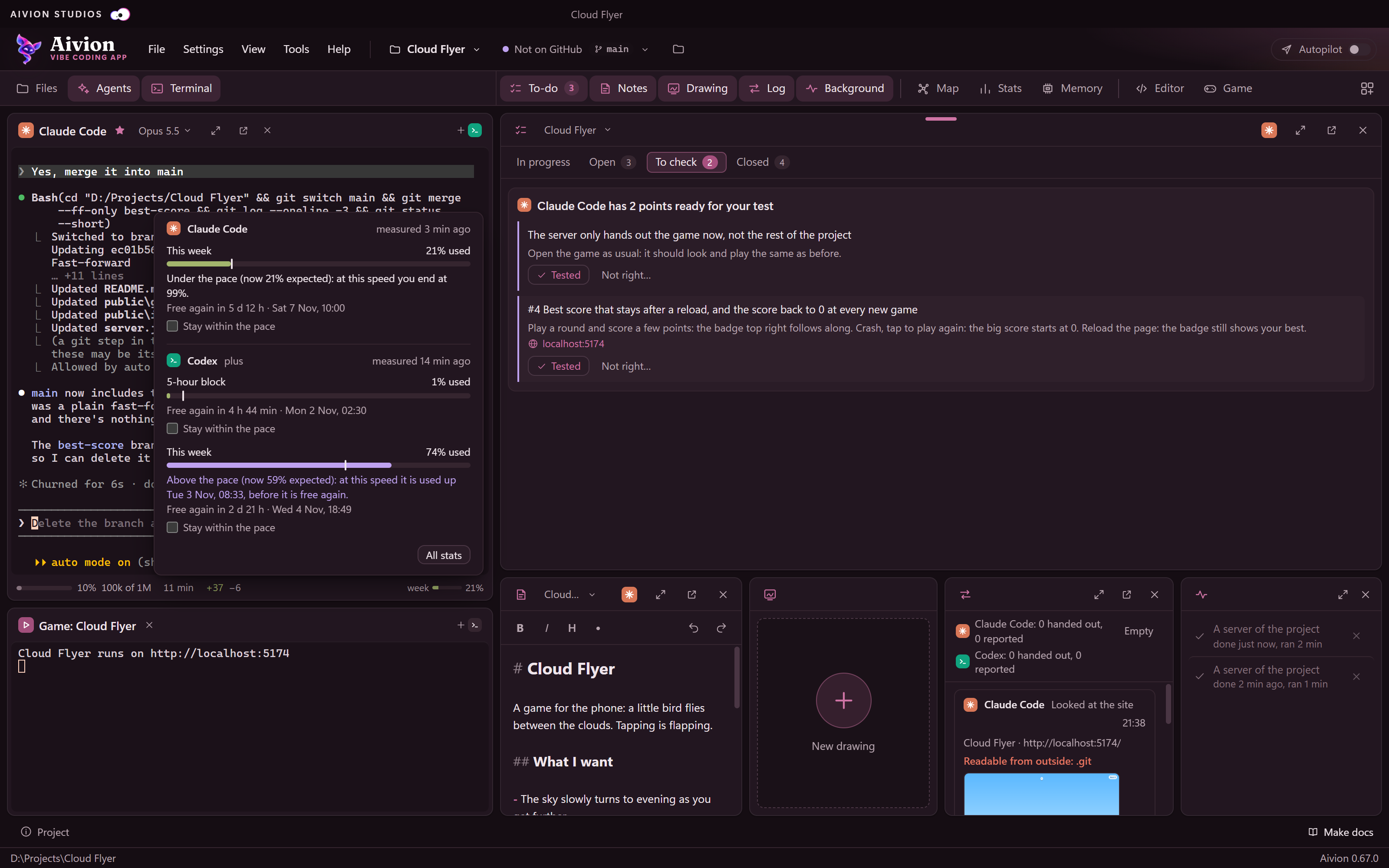
The bar under an agent shows how full its conversation is, and how much of the limits of your subscription is used. A click shows it for both: how much is used, where you end at this pace, and when it is free again. Tick Stay within the pace, and autopilot lets an agent wait while it uses a limit faster than spread evenly. How much of your week is used, and where this pace ends Stay within the pace, with one tick
  1. How much of your week is used, and where this pace ends
  2. Stay within the pace, with one tick

Limits and pace

The bar under an agent shows how full its conversation is, and how much of the limits of your subscription is used. A click shows it for both: how much is used, where you end at this pace, and when it is free again. Tick Stay within the pace, and autopilot lets an agent wait while it uses a limit faster than spread evenly.

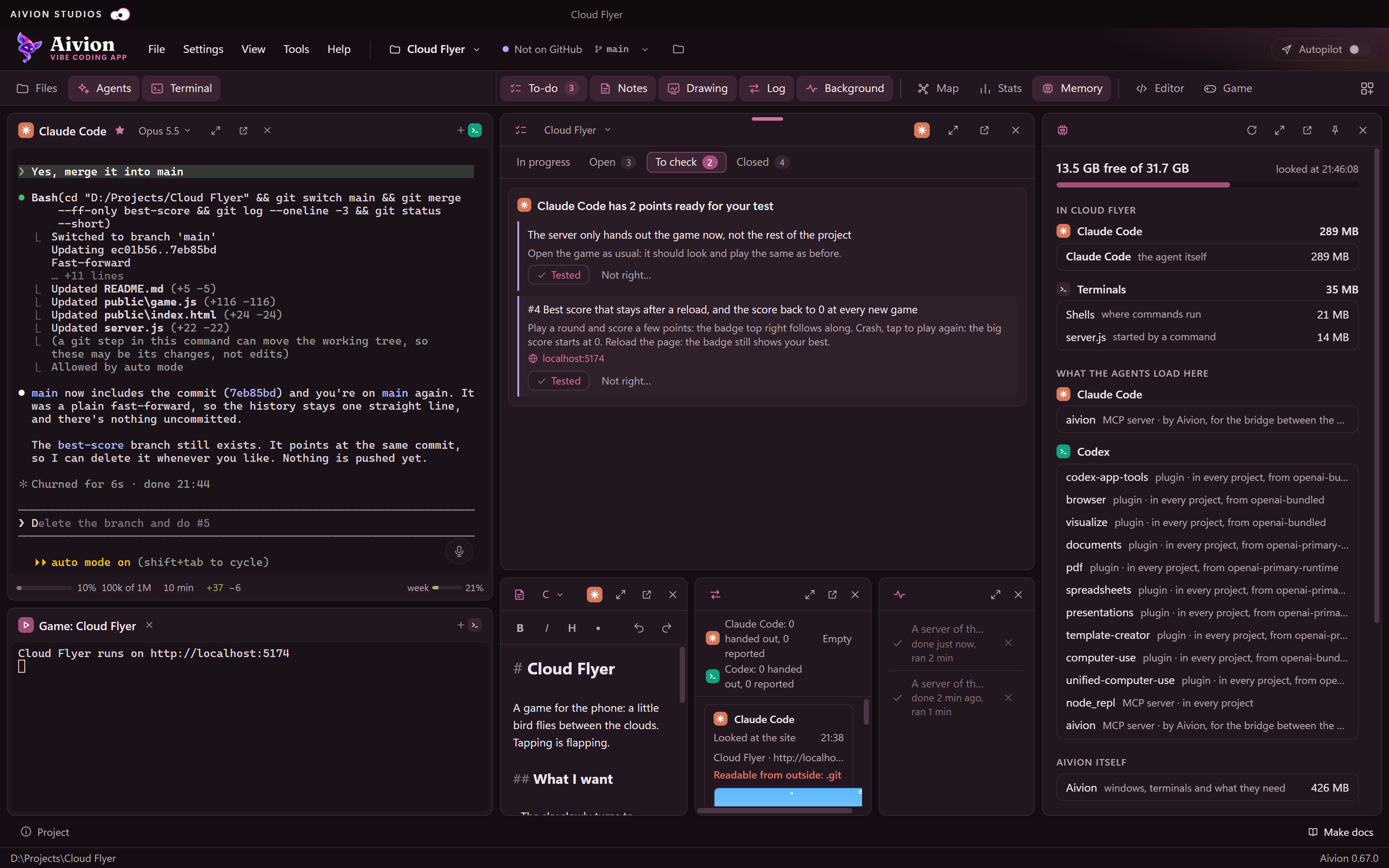
Windows counts everything that starts from Aivion as Aivion. The Memory panel tells it apart: Aivion itself, per project each agent with what it brings along, and what was left running loose. That last part Aivion stops after a question. When memory gets full, the bar at the bottom says what takes the most. Per project each agent, with what runs along with it Which plugins and MCP servers the agents load here
  1. Per project each agent, with what runs along with it
  2. Which plugins and MCP servers the agents load here

Memory

Windows counts everything that starts from Aivion as Aivion. The Memory panel tells it apart: Aivion itself, per project each agent with what it brings along, and what was left running loose. That last part Aivion stops after a question. When memory gets full, the bar at the bottom says what takes the most.

A new version of Aivion announces itself with what is new; you choose now, later or skip. The programs of your workplace you update with "Update all". Updates of a project the agent weighs first: it says what will change, and waits for your yes. What is behind, and whether updating is safe Let the agent weigh it first, or choose what to update yourself
  1. What is behind, and whether updating is safe
  2. Let the agent weigh it first, or choose what to update yourself

Updates

A new version of Aivion announces itself with what is new; you choose now, later or skip. The programs of your workplace you update with "Update all". Updates of a project the agent weighs first: it says what will change, and waits for your yes.

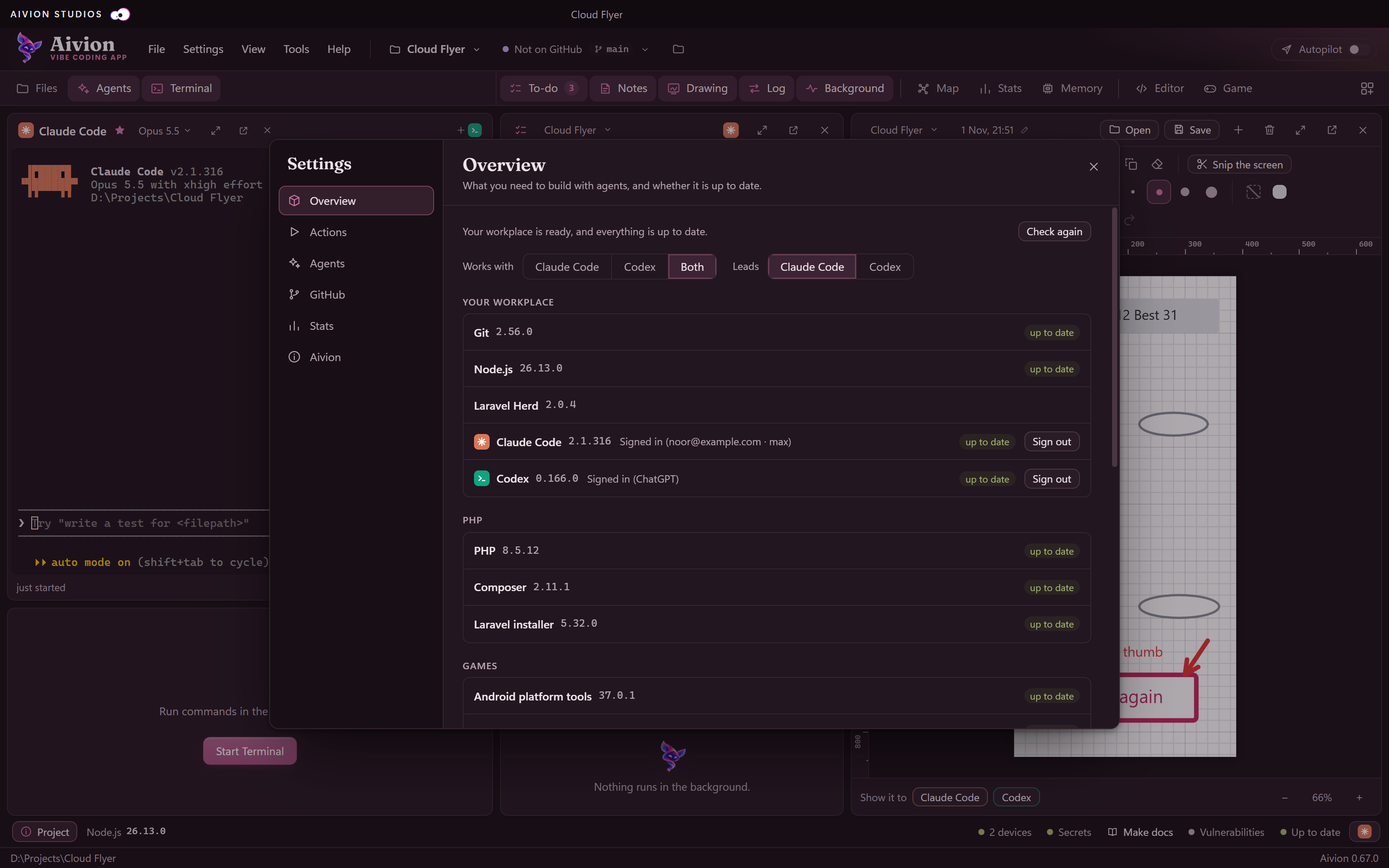
A new computer gets everything from one page: Git, Node.js, Laravel Herd, Claude Code and Codex, straight from the makers, in a terminal you watch. Work with Claude Code, Codex or both, and choose who leads Everything you need on one page, and whether it is up to date
  1. Work with Claude Code, Codex or both, and choose who leads
  2. Everything you need on one page, and whether it is up to date

Set up

A new computer gets everything from one page: Git, Node.js, Laravel Herd, Claude Code and Codex, straight from the makers, in a terminal you watch.

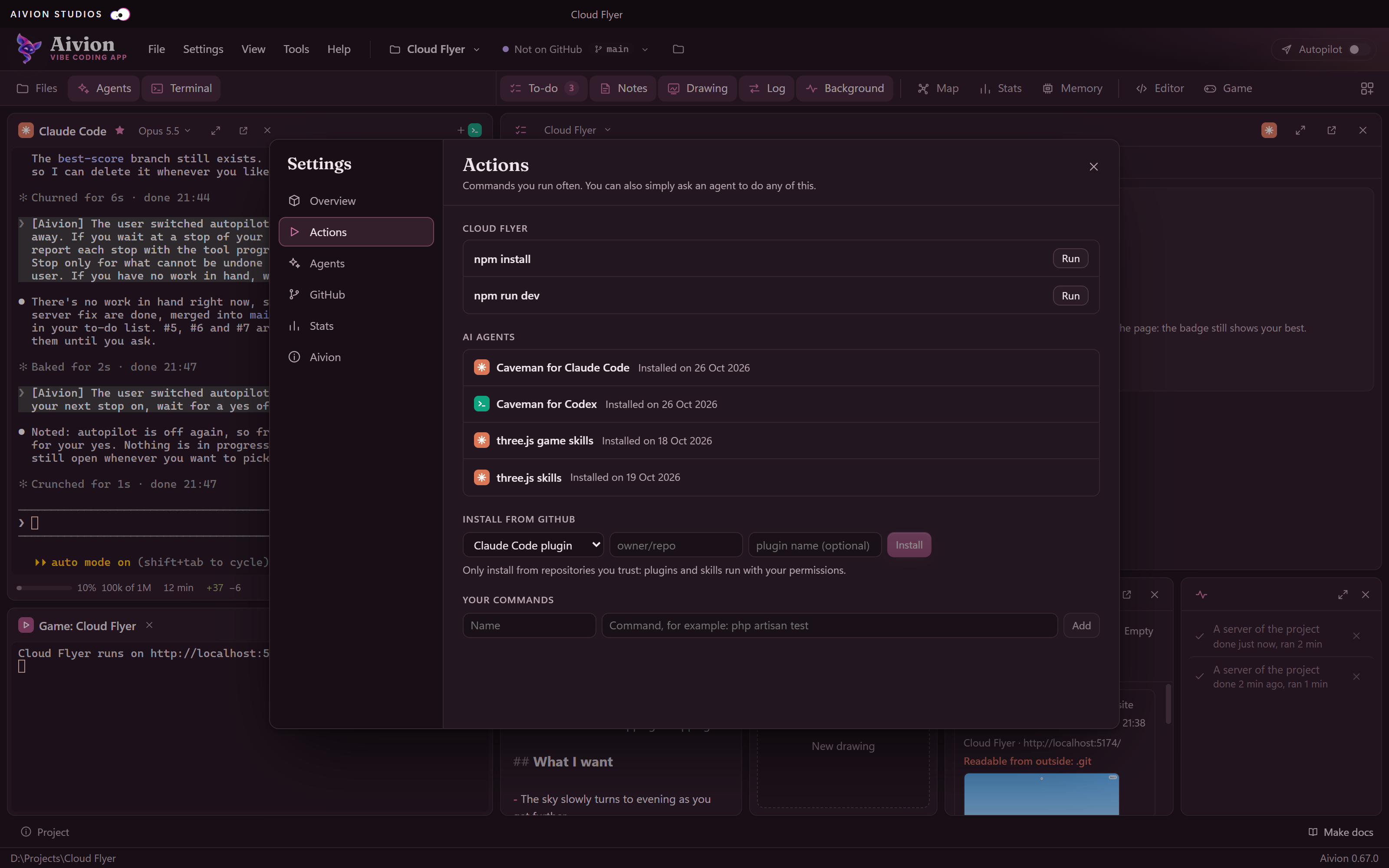
The Overview shows what Claude Code and Codex load in every project: plugins, skills and MCP servers. When one comes from GitHub, you see whether it changed since. Under Actions you install one from GitHub. The plugins and skills of your agents, with when they came Install one from GitHub
  1. The plugins and skills of your agents, with when they came
  2. Install one from GitHub

Plugins and skills

The Overview shows what Claude Code and Codex load in every project: plugins, skills and MCP servers. When one comes from GitHub, you see whether it changed since. Under Actions you install one from GitHub.

N° 06Getting started

From download to workplace.

Installing, activating, finding your way, and Aivion in your own language.

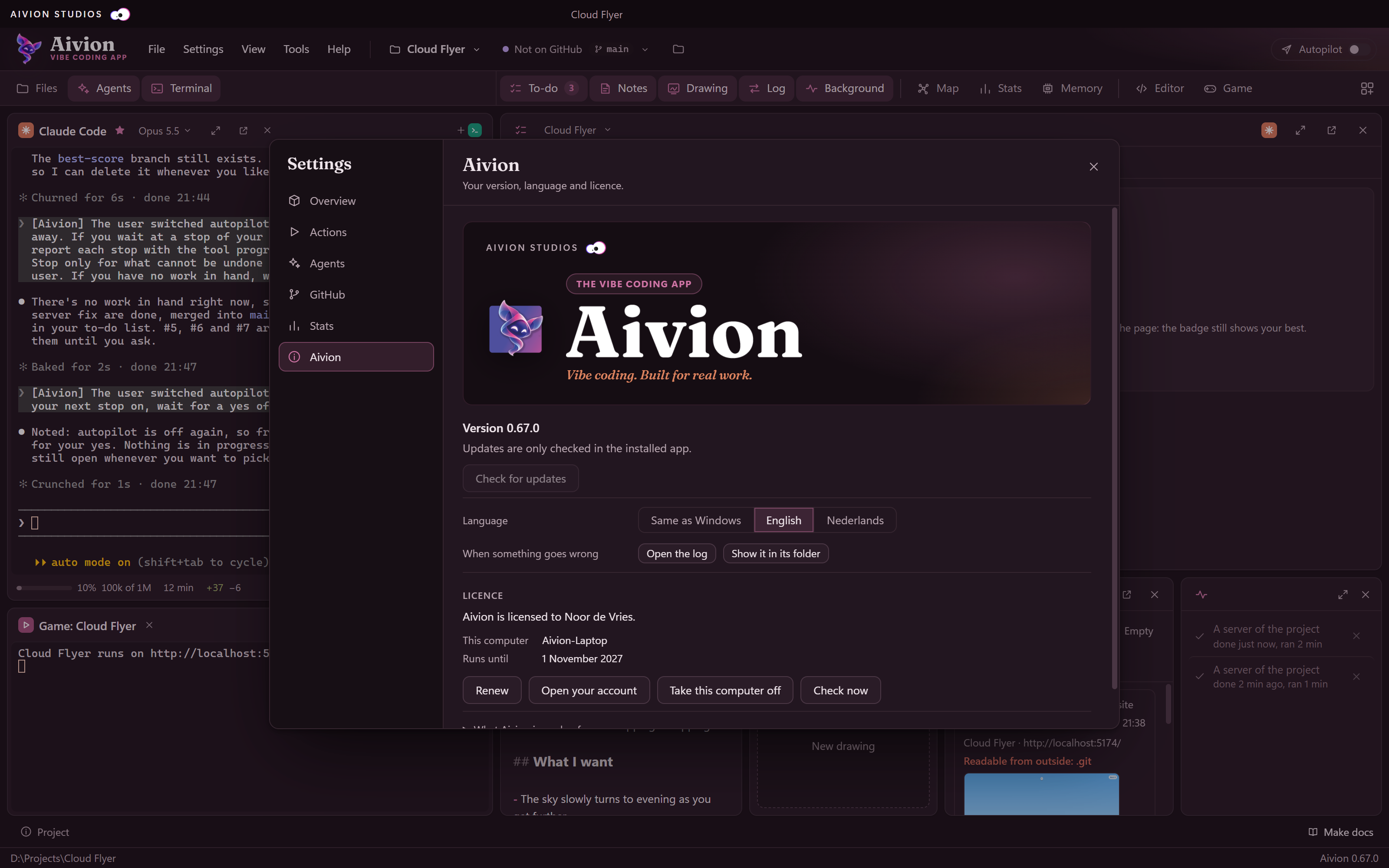
Click Log in and log in with your account, or enter your licence code. Your licence runs for a year, works on three computers at a time, and stays valid for 30 days without the internet. In your name, and until when it runs Renew, open your account or take this computer off
  1. In your name, and until when it runs
  2. Renew, open your account or take this computer off

Activating

Click Log in and log in with your account, or enter your licence code. Your licence runs for a year, works on three computers at a time, and stays valid for 30 days without the internet.

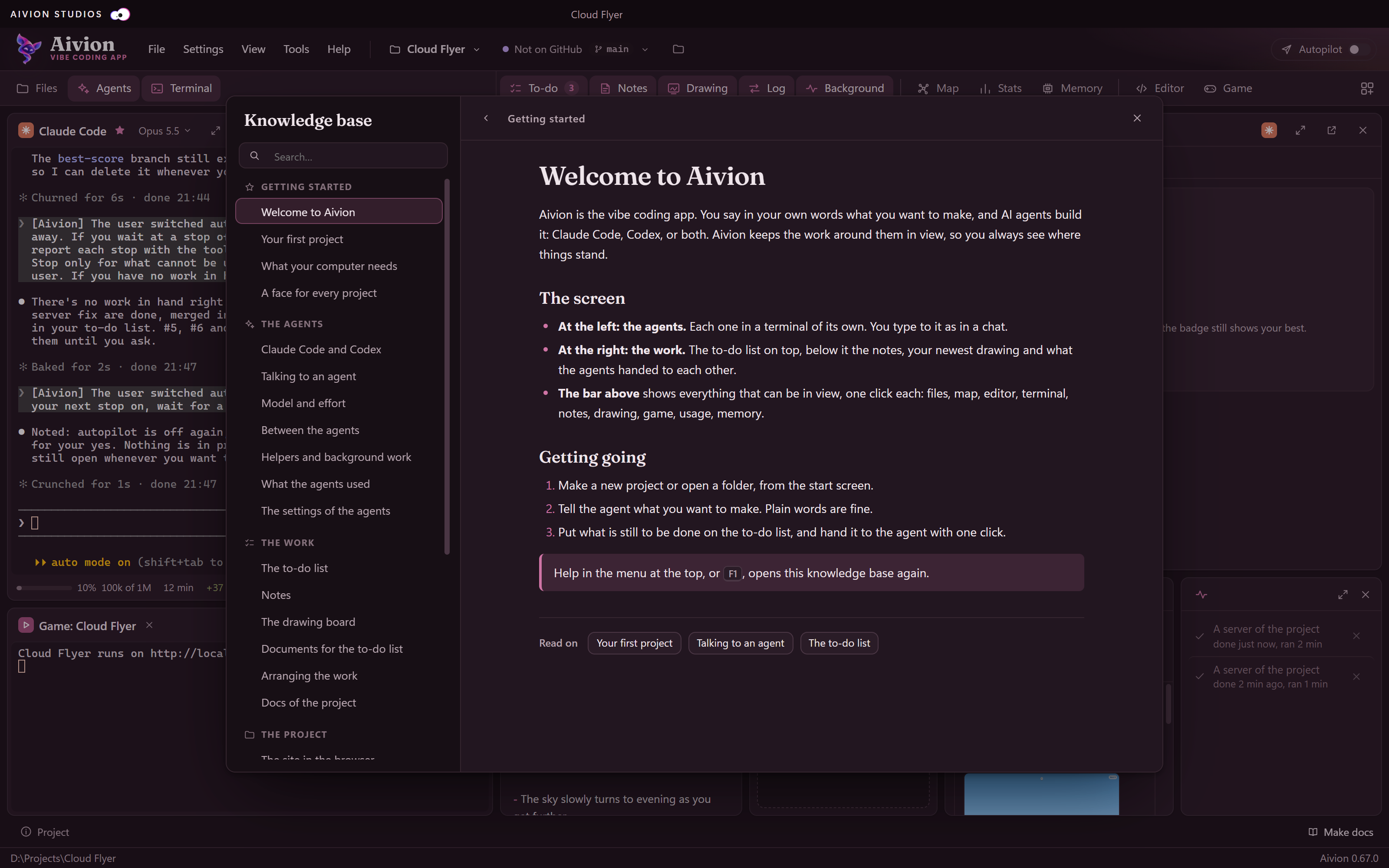
Aivion explains itself, in articles by topic, with a search. F1 opens it, wherever you are. A search field through every article F1 opens it, wherever you are
  1. A search field through every article
  2. F1 opens it, wherever you are

Knowledge base

Aivion explains itself, in articles by topic, with a search. F1 opens it, wherever you are.

Installing

An installer in the look of Aivion, for Windows 10 and 11, with the licence terms to read in it. The first time, it sets up step by step what building with agents takes: Git, Node.js, Laravel Herd, and Claude Code or Codex, as you choose. What is already there stays as it is.

Dutch and English

Aivion speaks Dutch and English: the language you choose, or that of Windows.

Leaves cleanly

Uninstall Aivion, and it clears away what it brought itself, and you choose what goes. What was on your computer before stays. The place of the computer on your licence comes free by itself.

The proof

Built with itself.

This app. This website. Both made in Aivion.

The maker of Aivion writes no code. Every new version was built in the one before, by saying what had to come. This website too.

0lines of code typed by hand
Everyversion built in the one before

What will you make?

Not for sale yet Questions

One licence per year · Not renewed automatically · All updates included
All updates included while your licence runs.